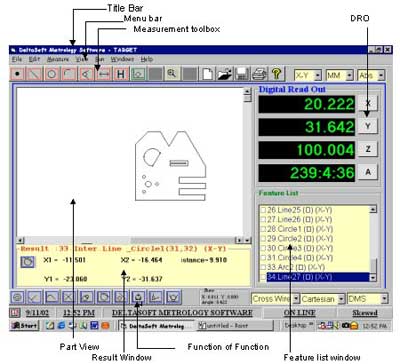
We are offering deltasoft software is a sophisticated electronic comparator, designed for accurate electronic measurement and inspection of specific dimensional tolerances, along with max. Min and range. Moreover, the deltasoft software is equipped with a 'program' function, which provides for convenient pre-setting of values, tolerance limits and calibration. In addition, all the buttons are soft-touch type, to facilitate easy operation. features
- two probe input : a, b, a/2, b/2, and combinations
- calibration and zero setting in one key operation
- 32 character back-lit alphanumeric display
- measuring possible with, or without tolerance
- measuring ranges of; + 5mm, + 0.5mm, + 0.05mm
- led indicators for; 'within tolerance', 'rework' & 'reject' and relay output of the same
- three least counts; 0.001mm, 0.0001mm, 0.00001mm
- analogue output
- pre-set value input available
- rs 485 & rs232 output in ascii format for computer or gauge management
- true inch / metric conversion
- polarity selector for internal or external measurements
- set configuration automatically memorized at switch off
- tolerance can be set for individual probe
- max min & range
details of operation
- pgm : to enter the program mode to set measuring range, preset values and tolerance values, using selection keys, pressing pgm again will exit program mode
- cal/mode : to toggle between calibration mode, program mode, and normal operating mode. In cal mode, it scrolls from am to am+p to tole to toli to am
- unit/enter : to instantly switch between metric/inch readings. Enter key also used to accept each step of calibration.
- tol/range : to establish the range of tolerance. Range key used to key in different ranges. It scrolls from r1 to r2 to r3 to r1 each time the key is pressed.
- send/>(right arrow) : used to enter values. Done by shifting digits to the right one at a time.
- clr/^(up arrow) : to enter values. Done by incrementing digits by 1 each time the key is pressed.
- max : maximum of the probe measurement will be stored
- range : difference of max and min is total range of measurement
- a : to select probe a for calibration
- b : to select probe b for calibration
- led(yellow) : for quick indication that checked component requires 'rework' when led lights up
- led(green) : for quick indication that checked component is 'ok' when led lights up
- led(red) : for quick indication that checked component is a 'reject' when led lights up
- screen : 2 lines of 16 characters each, alpha numeric lcd display, with backlight for easy viewing in all inspection conditions
- min : minimum of the probe measurement will be stored
 S. N. Eswar (Metrology Equipment Private Limited)
 No. 2e2, Dyavasandra Industrial Area, Whitefield Road, Bengaluru, Karnataka - 560048
 Share us via







 Write a Review