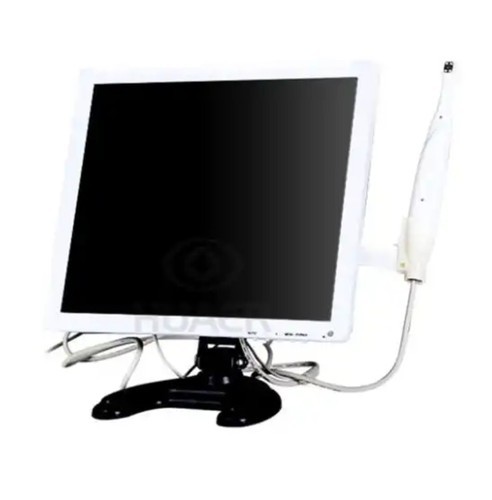
DENTAL DIGITAL INTRAORAL CAMERA WITH MONITOR 17-inch high-definition large screen, 4 megapixels, all sorts of details at a glance, to help doctors diagnose, easy for patients to understand the condition, store pictures, build medical files. PRODUCT DETAILS Intraoral camera is the most convenient, most direct and effective medical device for medical personnel to observe the diseased tissue in the human body. It has the advantages of high image clarity, vivid colors, and easy operation. Image sensor: 1/5 CMOS sensor Image resolution: 2 mega pixel, software upgrade to 4 megapixel Camera Angle: no-plastic lenses level large field of view to 130 degrees, especially suitable for the mouth of a scan video signal output format: VGA HD 720p signal source Camera lighting: Four high-energy LED cold light design Focus point range:1mm50mm automatic support Use way: Handheld integration of one handle Special functional design: SD card large storage function, HD-720Pvideo, system clock management functions, have the picture in picture capture mode and automatic shutdown function more than 5 SEC Work power requirements: 5 v 1 A stable DC power suppl Technical data Suit for Dental office, Dental school, home Pixes 4 Megapixels Image Sensor 1/5 CMOS sensor Features Can take vivid image of the entire mouth OEM Available for labelling your brand on the intraoral camera Video Output Signal Format VGA HD 720p signal source Visual Angle 130 Degree Color White Color Can be equipped with Professional Dental office unit or use together with computer Power Supply 5 v 1 A stable DC power supply 15 Inches 36.5*28.8*5CM 17 Inches 38.3*31.5*5CM (1) Reduce inspection time and snapshots. (2) With video and storage capabilities, it can store lesion images for easy observation and continuous observation; (3) bright colors, high resolution, clear images, easy to observe; (4) Using the screen display image to achieve simultaneous viewing of multiple people, facilitating disease consultation, diagnosis and teaching; Package List 15/17 Inches 4 Megapixels Dental intraodal camera User Manual Disposable plastic mask for intraoral camera Software for Dental intraoral camera Maintenance: In general, the display has been tested by relevant technicians and adjusted to the best display state during the installation process. Therefore, users are not advised to perform debugging. If the monitor does not display, check the connection between the power board and the power board, whether the monitor switch is turned on, the camera system is turned on, and the camera systems output is properly connected to the monitors input port. After the color is distorted, the optical interface of the camera system can be aligned with a bright color object or image, and the contrast, saturation, and brightness of the camera can be adjusted through menus on the display. Avoid permanent magnetic objects near the monitor. Degauss maintenance at regular intervals. When the magnetization is severe or the degauss fails, contact the manufacturers technician.
 Write a Review
 NEW INDIA WORKS (NEW INDIA WORKS)
 A 704 Jaswanti Allied Business Centre, Behind Hotel Khwaish Presidency, Ramchandra Lane, Off. Link Road, Near Kanchpada, Malad West, – 400064, Mumbai, Maharashtra
 Share us via