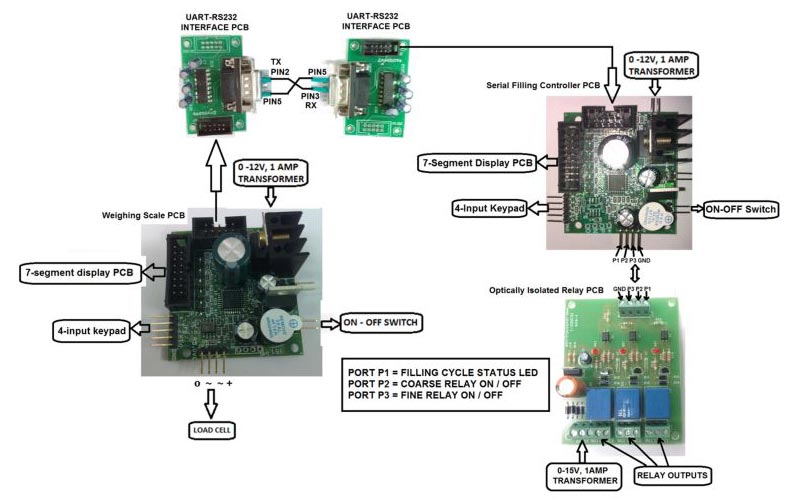
The Kit contains the following items
- Weigh (Bridge) Scale PCB R5.0V1 – 1no.
- Serial Filling Controller R5.0V1 PCB – 1no.
- UART-RS232 interface PCB – 2nos.
- RS232 interface cable – 1no.
- 0.56” Red display – 2nos.
- 4-input Keypad with connector – 2nos.
- 0-12V/1Amps transformer – 2no.
- 0-15V/1Amps transformer – 1no.
Function and Parameter settings in Serial Filling Controller PCB : Listed below are the various display indications for function and parameter settings.
- PIN – Password identification number.
- PARA – Parameter Settings.
- BAUD – Baud rate settings.
- MDP – Manual fixing of decimal point.
- COD – Charging Or Discharging mode.
- PS – Power save option in display.
- SET-1 – Target value of filling controller.
- L-TARE – Minimum weight of empty container to initiate or start filling cycle operation.
- H-TARE – Maximum weight of empty container to initiate or start filling cycle operation.
- FINE – Weight of filling material to be discharged slowly once coarse relay is switched off.
- ERROR – Difference between Target value (SET-1 value) and the actual weight filled in the container when ERROR is initially set to zero. The system assumes the error to be only positive.
Function Keys in Serial Filling Controller PCB
- Press TARE key(K4) and then power ON the PCB – To enter into settings mode.
- Long press of TARE key(K4) after the PCB is powered on – To enter set-point value.
- Short press of INCREMENT key(K2) – To start filling cycle.
- Short press of SHIFT key(K3) when filling in progress – Pause filling operation.
- Short press of SHIFT key(K3) when in Pause mode – Returns to normal filling operation.
- Short press of ENTER key(K1) when in filling or pause mode – Exit filling cycle and resets relay.

 GST : 33AFSPR0054E1ZJ
 4.6/5
4.6/5
 Raghunathan P (I-SYS)
 #1, 12th East Street, Kamaraj Nagar, Thiruvanmiyur, Chennai, Tamil Nadu - 600041, India
 https://www.isysindia.com
 Share us via