
Products / Services
  • Products / Services
  • Companies
  • Buy Leads
    Post Buy Requirement

    CleanRoom Monitor

    • Total CarbohydrateOne year
    • Weight4.12Kg
    • Display unitμg/  
    • Power230 V AC, 50/60 Hz
    • Supply TypeManufacturer, Exporter, Supplier, Retailer
    • Preferred Buyer Location All over the world
    View More Details
    Send Enquiry

    Company Information

    • calendar Member Since 7 Years
    • building Nature of Business Retailer

    Ask for more detail from the seller

    Contact Supplier
    Report incorrect details
    • Product Details

    • Company Details

    no_img_icon

    • Total CarbohydrateOne year
    • Display7" HD DISPLAY
    • CalibrationFactory calibrated valid for 1year
    • Display unitμg/  
    • Weight4.12Kg
    • Dimension14.5 x 9 x 3" (368 x 229 x 76mm)
    • Continuous Operation24 hours
    • Humidity / Resolution /  Accuracy10 to 90%RH / 1%RH / ±4%RH
    • Response Time<6 seconds
    • Accuracy±15 μg/
    • Dust particle Concentration Range0 μg/ to 1,000 μg/
    • Count ModeAutomatic
    • Temperature/  Resolution / Accuracy0 to 50°C / (1°C) / (±1°C)
    • Operating principleLaser scattering
    • Power230 V AC, 50/60 Hz
    • MemoryIn built storage of 1 million readings
    • Communication ModeWIFI

    Model : N-PM100

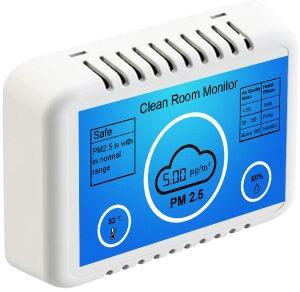
    Navter's clean room monitor is a portable desktop and wall mountable instrument that measures dust particle concentration in air. The instrument displays the real-time value of dust particle concentration in μg/m³, temperature and relative humidity.  It has built-in storage for continuous data logging and Wi-Fi connectivity for easy access of data log.


    Features:


    • Quick response time less than 30 sec
    • Particle sensor is a laser-based sensor which uses the light scattering method to detect and count dust particles in the concentration range of 0 μg/to 1,000 μg/ with ±15 μg/
    • 7 Inch HD screen with intuitive, rich graphical display of dust particle concentration, temperature, humidity and dust particle concentration vs health effects table
    • Automatic change of color, theme and safety alert message indicating dust particle concentration.
    • Real time continuous data logging of STEL (average of every 15 min.) & TWA (average of every hour).
    • Data log in MS Excel file format Download
    • Easy 2-step wireless connectivity
    • In Built storage of 1 million readings
    • Wall mountable and desk top device
    • Optional HDMI output
    • No warm up time

    The clean room monitor has automatic data logging of STEL (short term exposure limit) values every 15 minutes throughout the operation of the monitor. It has inbuilt storage of 16GB that can store more than a million data records.

    The data log stored in the device can be easily accessed from any Wi-Fi enabled device such as smartphone, pc, laptop etc. The data log has auto generated graph of dust particle concentration versus date & time.


    The clean room monitor alerts the user of real time changes in dust particle concentration with safety alert message and three different colors green, orange and red indicating the range, for easy visual perception.The safety alert message is displayed as ‘safe’ and the display color is green when the dust particle concentration is in the range of 0 – 50 μg/, the display color and safety alert message changes automatically with change in dust particle concentration.


    Particle concentrationColorAlert message
    0 – 50 μg/GreenSafe
    50 - 200 μg/OrangeRisky
    200 – 1000 μg/RedDanger
    Interested in this product? Ask for more details & Latest Price from seller
    Send Enquiry
    Share your requirements for a quick response!
    Tell us what you need?

    Looking for CleanRoom Monitor?

    Quantity
    Seller Contact Details
    • Sellernavter
    • Address Oragadam, Chennai, Tamil Nadu
    To list your productBoost Your Business Visibility WorldwideRegister Now
    To list your productBoost Your Business Visibility WorldwideRegister Now
    Waiting for permission
    To search by voice, go to your browser settings and allow access to microphone

    Allow microphone access to search with voice




