
Company Information
 Member Since 12 Years
 Nature of Business Retailer Year of Establishment 2011
Ask for more detail from the seller
Contact Supplier
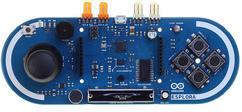
Arduino Esplora.
The Arduino Esplora is a microcontroller board derived from the Arduino Leonardo. The Esplora differs from all preceding Arduino boards in that it provides a number of built-in, ready-to-use set of onboard sensors for interaction. It's designed for people who want to get up and running with Arduino without having to learn about the electronics first. For a step-by-step introduction to the Esplora, check out the Getting Started with Esplora guide. The Esplora has onboard sound and light outputs, and several input sensors, including a joystick, a slider, a temperature sensor, an accelerometer, a microphone, and a light sensor. It also has the potential to expand its capabilities with two Tinkerkit input and output connectors, and a socket for a color TFT LCD screen.
Like the Leonardo board, the Esplora uses an Atmega32U4 AVR microcontroller with 16 MHz crystal oscillator and a micro USB connection capable of acting as a USB client device, like a mouse or a keyboard.
In the upper left corner of the board there is a reset pushbutton, that you can use to restart the board.
There are four status LEDS :
ON [green] indicates whether the board is receiving power supply
L [yellow] connected directly to the microcontroller, accessible through pin 13
RX and TX [yellow] indicates the data being transmitted or received over the USB communication
The board contains everything needed to support the microcontroller; simply connect it to a computer with a USB cable to get started.



Connect with us





 For Buyer
  For Seller
  Help
Help 

 Gondal, Rajkot, Gujarat
 Send Enquiry