
Products / Services
  • Products / Services
  • Companies
  • Buy Leads
    Post Buy Requirement

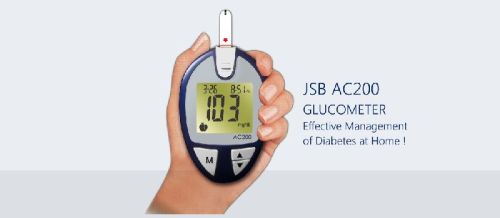
    Glucometer JSB AC200 Glucose Monitor

    • Brand Name JSB
    • Number Of Flower Biosensor Technology
    • Power Consumption 3V
    • Model AC200
    • Supply TypeManufacturer, Exporter, Supplier, Retailer
    • Preferred Buyer Location All over the world
    View More Details
    Send Enquiry

    Company Information

    • calendar Member Since 9 Years
    • building Nature of Business Retailer

    Ask for more detail from the seller

    Contact Supplier
    Report incorrect details
    • Product Details

    • Company Details

    no_img_icon

    • Brand Name JSB
    • Number Of Flower Biosensor Technology
    • Power Consumption 3V
    • Chord Length N/A
    • Other Features Large LCD, No Coding, Glucometer with strips ejection feature
    • Power Source2 X AAA battery
    • Model AC200
    • Weight 250 gms.
    • Box Dimension 5.4″ X 6.2″ X 2.1″
    • In the Box 1 pc JSB AC200 Blood Glucose Meter, 25 test strips, 25 lancets, lancing device, instruction manual.

    Product Features
    • No coding
    • 500 test memories with date and time
    • With strips ejection button : For contamination free disposal of strips
    • High and Low Reading setting
    • 4 User Alarms
    • With PC connectivity (optional)
    • Inserting strip turns on meter automatically
    • Taking out strip turns the meter off
    • Large LCD screen
    • Result in 10 seconds
    • Easy to use
    • Can test in mg/dl as well as mmol/dl
    • Compact & portable
    • Small blood volume required (0.5uL)
    • Symbolic Display
    • FDA approved
    • CE Certified
    • Offer Includes : Blood Glucose Meter, 25 strips, 25 lancets, lancing device, carry case, instruction manual, battery


    Instructions Of Use

    The JSB AC200 Blood Glucose Meter works on latest biosensor technology to give accurate results in seconds.

    1. Unpack the JSB AC200 Blood Glucose Meter from the product box.
    2. Insert the battery into the Blood Glucose Meter battery compartment.
    3. Follow the steps on the Blood Glucose Meter screen to set the date and time (kindly refer instruction manual for more details)
    4. For testing, wash your hands with soap/spirit swab, dry them and take out the test strip vial.
    5. Take one strip from the vial and close the vial lid tightly.
    6. In standby position, insert the strip into the strips compartment of the Blood Glucose Meter (see video for more details)
    7. Prepare the lancing device and lancet for use (see video for more details)
    8. Massage your hand and finger before pricking the lancet to extract a drop of blood.
    9. When the Blood Glucose Meter asks to apply blood, touch the blood drop extracted from finger on to the test strip end. The test strip will suck the blood and start testing.
    10. The Blood Glucose Monitor will show the result of your current blood sugar on the screen.
    11. You may now press the ejection button on the Blood Glucose Monitor to dispose off the used strip, and the ejection button on the lancing device to dispose off the lancets.
    12. Store the Blood Glucose Meter in a cool dry place away from sunlight and extreme weathers.
    13. Read the instruction manual thoroughly before using the Blood Glucose Meter.
      Brand JSB
      Model AC200
      Colour White-Blue
      Box Dimension 5.4″ X 6.2″ X 2.1″
      Weight 250 gms.
      Chord Length N/A
      Type Biosensor Technology
      Other Features Large LCD, No Coding, Glucometer with strips ejection feature
      Power Source2 X AAA battery
      Power Consumption 3V
      In the Box 1 pc JSB AC200 Blood Glucose Meter, 25 test strips, 25 lancets, lancing device, instruction manual.


    Interested in this product? Ask for more details & Latest Price from seller
    Send Enquiry
    Share your requirements for a quick response!
    Tell us what you need?

    Looking for Glucometer JSB AC200 Glucose Monitor?

    Quantity
    Seller Contact Details
    To list your productBoost Your Business Visibility WorldwideRegister Now
    To list your productBoost Your Business Visibility WorldwideRegister Now
    Waiting for permission
    To search by voice, go to your browser settings and allow access to microphone

    Allow microphone access to search with voice




