
Company Information
 Member Since 15 Years
 Nature of Business Retailer Year of Establishment 2010
Ask for more detail from the seller
Contact Supplier
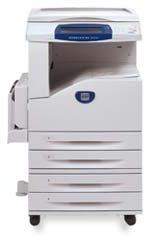
We are involved in offering Multifunction Printer (5222). Flexible and easy to maintain, our Printers are manufactured in sync with set industrial norms. Buyers can obtain these at competitive rates from us.
WorkCentre 5222 : The WorkCentre 5222 printer/copier is flexible and easy to maintain. You can add scanning or faxing as the needs of your business grow. It has flexible paper handling, powerful scanning features for your custom workflows, and advanced features to keep your data secure.
Competitive Edge :
Productivity Features :
Management and Security Features :
Scanning and Workflow Features :
Software and Solutions :
| At a Glance | |||
| Model | WorkCentre 5222 Copier | WorkCentre Copier | |
| Standard functions | Copy | Copy, Print | |
| Optional functions | Internet fax, LAN fax, Print, Scan, Walkup fax | Email, Internet fax, LAN fax, Network fax server, Scan, Walkup fax | |
| Copy/print speed | up to 22 ppm | ||
| Connectivity | USB 2.0 (optional: 10/100BaseTX Ethernet) | 10/100BaseTX Ethernet, USB 2.0 | |
| Device memory (standard/max) | 256 MB / 512 MB | 512 MB / 512 MB | |
| Hard drive | Optional 40 GB | Standard 40 GB | |
| Detailed specifications | See specifications | ||
| Next Steps | Find local dealer | Find local dealer | |
| Model Configurations | |||
| WorkCentre 5222 Copier | WorkCentre Copier | ||
| Standard functions | Copy | Copy, Print | |
| Optional functions | Internet fax, LAN fax, Print, Scan, Walkup fax | Email, Internet fax, LAN fax, Network fax server, Scan, Walkup fax | |
| Copy/print speed | up to 22 ppm | ||
| Connectivity | USB 2.0 (optional: 10/100BaseTX Ethernet) | 10/100BaseTX Ethernet, USB 2.0 | |
| Device memory (standard/max) | 256 MB / 512 MB | 512 MB / 512 MB | |
| Hard drive | Optional 40 GB | Standard 40 GB | |
| Document feeder type | Duplex Automatic Document Feeder | ||
| Standard paper capacity | 1,100 sheets | ||
| Maximum paper capacity | 2,100 sheets | ||
| Page Description Languages (PDL) | PCL® 5e emulation, PCL® 6 emulation (optional: Adobe PostScript® 3™) | ||
| Print features | Banner sheets, Booklet printing, Booklet printing (requires two-sided printing), Delay print, Mirror image, N-up | ||
| Network protocols | EtherTalk ®, FTP, HTTP, HTTPs, LPR, SNMPv1, SNMPv2, SNMPv3, TCP/IP | ||
| Standard security features | HTTPS (secure scan and network server), IP filtering, Network authentication, SNMPv3, Secure Print | ||
| Accounting | Internal Auditron - Copy, Job Based Accounting (3rd Party Enablement), Xerox Standard Accounting (all functions) | Internal Auditron, Job Based Accounting (3rd Party Enablement), Network Accounting Enablement, Xerox Standard Accounting (all functions) | |
| Productivity features | Book copying, Build Job, Collation, Consumable life reporting, Job interrupt, Job queue, Sample set, Separator pages, Transparency separators, Watermarks | Annotation, Bates Stamping, Book copying, Build Job, Collation, Consumable life reporting, Job interrupt, Job queue, Sample set, Separator pages, Transparency separators, Watermarks | |
| Device management features | SNMP v.1, SNMP v.2, SNMP v.3, Xerox CentreWare® Internet Services Embedded Web Server | ||
| Recommended monthly print volume | Up to 12,000 pages | ||
| Duty cycle | Up to 70,000 images/month | ||
| Detailed Specifications | |||
| Media Handling | |||
| Document handler | Duplex Automatic Document Feeder Size: 5.5 x 8.3 in. to 11.7 x 17 in. | ||
| Two-sided output | Standard | ||
| Output capacity | 500 sheets | ||
| Finishing options | Integrated Office Finisher (Optional): Single-position stapling, 500-sheet tray | ||
| Copy | |||
| First-page-out time, copying | As fast as 4.3 seconds | ||
| Maximum copy resolution | 600 x 600 dpi | ||
| Copy features | 2in1 Copying, Auto reduction/enlargement, Booklet creation, Booklet creation (requires two-sided output), ID Card Copy, Image shift, Margin shift, Mirrored image, N-up, Negative image, Poster mode, Reduce / Enlarge, Scan once - print many, Stored job settings, Touch screen interface | ||
| Print technology | Laser | ||
| Processor | PowerPC® 333 MHz | ||
| Scan | |||
| Scan destinations (optional) | Network scanning, Scan to desktop, Scan to email, Scan to home, Scan to mailbox | ||
| Scan file formats | PDF, TIFF, XPS, multipage TIFF | ||
| Scan resolution (optical) | 600 x 600 dpi | ||
| Scanning software (optional) | Scan to PC Desktop® Small Business Edition Pro, Scan to PC Desktop® Small Business Edition SE, Various Xerox Business Partner Solutions, Xerox SMARTsend, Xerox SMARTsend Professional | ||
| Scan technology | CIS | ||
| Fax | |||
| Fax options | Internet fax, LAN fax, Network fax server enablement, PC fax, Walkup fax | ||
| Fax send features (optional) | Auto fax transmission reduction, Automatic memory resend, Batch transmission, Broadcast, Cover sheets, Delay fax, Fax from platen, Page-by-page job status at the machine, Priority fax, Priority send | ||
| Fax features (optional) | Memory fax, Polling, Secure fax: receive | ||
| Speed dials (one line) | Up to 500 | ||
| Fax resolution | Superfine (400 x 400 dpi) | ||
| QuickScan resolution | 200 x 200 dpi | ||
| QuickScan speed | 44.8 pps | ||
| Fax compression | JBIG, MMR/MR/MH | ||
| ITU compatibility | Super Group 3 | ||
| Security | |||
| Optional security features | Audit log, Fax security, Image overwrite security, Lock printing of received faxes, Xerox Secure Access Unified ID System | ||
| Accounting | |||
| Accounting | Job Based Accounting (3rd Party Enablement), Xerox Standard Accounting (all functions) | ||
| Dimensions | |||
| Dimensions (WxDxH) | 25.2 x 25.7 x 43.1 in. | ||
| Electrical | |||
| Energy Star | Energy Star qualified | ||
| Environment | |||
| Sound power levels | 7.2 B (operating), 3.8 B (standby) | ||
| Sound pressure levels | 56 dB (operating), 22 dB (standby) | ||



Connect with us





 For Buyer
  For Seller
  Help
Help 

 Bengaluru, Karnataka
 Send Enquiry