
Products / Services
  • Products / Services
  • Companies
  • Buy Leads
    Post Buy Requirement

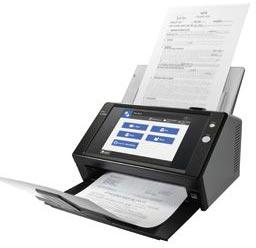
    Network Fi Series Image Scanner

    • Supply TypeSupplier, Retailer
    • Preferred Buyer Location All over the world

    Customers throughout the country can get in touch with us for obtaining our superior grade Network Fi Series Image Scanner. Our N7100 network scanner is offered at modest prices and assured of a....
    View More Details
    Send Enquiry

    Company Information

    • calendar Member Since 14 Years
    • building Nature of Business Retailer
    • Year of Establishment 2010

    Ask for more detail from the seller

    Contact Supplier
    Report incorrect details
    • Product Details

    • Company Details

    no_img_icon

    Customers throughout the country can get in touch with us for obtaining our superior grade Network Fi Series Image Scanner. Our N7100 network scanner is offered at modest prices and assured of a prompt delivery throughout the country.


    Overview :
    Network Scanner to maximize business efficiency - With the functionality of many devices, yet the simplicity of one, the N7100 network scanner contains the qualities organizations of all sizes desire to improve business processes.

    • Ideal for Small and Medium Business
    • Space saving design
      • Multifunction functionality to reduce hardware costs
      • Local user accounts
      • Quiet operation
      • Loaded with intelligent scanning features
      • Outstanding price / performance
    • General office functionality
      • Fast scanning speeds of 25 pages per minute and true double-sided speeds of 50 images per minute in color, grayscale or monochrome @ 300 dpi
      • 50 page document feeder
      • Large 8.4” touch screen high resolution (1,024 x 768 pixels) display
      • Scan to e-mail, folder/FTP, network fax or printer or Microsoft SharePoint Server Enterprise features
      • *Limited version support for SharePoint*
      • Scanner Central Admin Server software
      • Job Menu’s based on individual user login to control scanning settings and destination(s)
      • High security to assist with compliance and regulation
      • SDK and optional third-party applications for integration with line of business systems

    Features :

    • Easy Stand-alone Network Operation with Large Display - Large size screen with integrated on-screen keyboard and PC functions are equipped in this compact network scanner. It can be used in the office or a teller window where space is limited. The user can perform scanning, data saving and transmission without the need to operate from a computer.
    • Quick scanning speed that supports plastic card - Scanning speed is consistent at 25 pages per minute (ppm) even when scanning full A4 color, double-sided, at 300dpi. N7100 is equipped with accurate and stable feeding mechanisms that support scanning from thin paper to thick paper, and plastic card. Plastic ID card and application forms can be scanned together easily at a teller window of banks or hospitals.
    • Less waiting time to achieve stress free scanning - In order for the user not to feel any stress, the image processing after scanning is quick thanks to the enhanced CPU/memory. The time from the start of scanning to the finish including image processing (when the preview of the last scanned page appears) is 50% shorter than the previous model(1). For regular scanning routines, only one touch of the scan button is necessary which greatly improves the productivity.
    • High security assuming to be shared by multiple users
    • The N7100 achieves high security on the premise that it is shared by multiple users. Not only verification before scanning, but also encryption while processing and data deletion after scanning are performed automatically. Users can use the network scanner with peace of mind.
    • Login authentication strictly controls what people can do with the scanner.
    • Scanned data can be output as password-protected PDF files.
    • Advanced security measures guard scanned data from prying eyes.
    • Encryption - N7100 encrypts and temporarily stores scanned data locally during processing for e-mails, faxes, printing and network storage.
    • Scanned data deletion - After scanned data has been e-mailed, faxed, printed out or saved to a network folder N7100 automatically deletes the temporarily stored data from its internal memory. Even if an error results in the data remaining in the memory, it is then automatically erased the next time the scanner is started up.
    • Secure Initialize - When N7100 is initialized, free regions of the internal memory can be overwritten with completely random, meaningless data. As an added security measure, a new cipher key is generated after the user information is deleted. All of this ensures that no trace of old user data can be retrieved from open memory.
    • Perfect Fit Customized to Your Unique Needs - n7100-job-menuAdministrators can customize the touch panel job menu and scan settings of N7100 to suit the work of a specific user or user group registered to the scanner. The user’s application can be integrated to the scanner as add-in software using the exclusive SDK (for Windows). N7100 comes with an open USB port to connect a keyboard or other USB devices(2) (except USB memory). N7100 can be customized to be a terminal exclusively for your operation.
    • To satisfy the security policy, anti-virus software can be installed as an option to safely expand the functions.
    • The SDK (software development kit) allows for the development of scanner controlled workplace applications. The Network Scanner Control SDK is free to download. Support scheme is different by each sales region.
    • High Quality Results Perfectly Suited for OCR - The scanner driver PaperStream IP, which supports TWAIN saves the hassle in fine adjusting the document for OCR processes. It automatically converts the images into exceptionally clean images, accelerating OCR even when scanning wrinkled/soiled document or documents with a background.
    • Automated functions take the work out of scanning
    • Advanced automated functions ensure N7100 digitizes your documents with remarkable precision and efficiency. Produce beautiful scans quickly with barely the need to lift a finger.
    • Auto Orientation    
    • Color Detection
    • Auto Deskew
    • Paper Size Detection
    • Blank Page Removal
    • Marker Index *
    • This function detects words marked with a highlighter and embeds them as keywords in PDF files.


    • Versatile range of use from SOHO to large enterprises
    • Connects with a variety of server types - N7100 easily satisfies the digitizing needs of small office networks which use a file server and e-mail server. It is also right at home with more complex LDAP/LDAPS authentication-based networks, integrated with Microsoft Exchange Server, SharePoint and other application hubs.
    • Set up and manage multiple N7100 scanners at one time - N7100 offers administration functions that allow you to individually or collectively setup and manage a vast network of N7100 units with ease from a single console.
    • Network Scanner Admin Tool - The Admin Tool function allows you to adjust running environment settings one scanner at a time.
    • Scanner Central Admin Console/Scanner Central Admin Server
    • Collectively monitor and manage scanner usage, settings and much more for multiple N7100 units through the Scanner Central Admin Server function.
    •  Time to scan 10 A4 sheets in color. Time from pressing the "scan" button until the completion of image processing (preview image of the last page appears) is 50% shorter compared to the predecessor N1800 (52 seconds reduced to 24 seconds)
    • Output resolution - 200dpi, Output file format: Multi-TIFF
    • Image Processing - Auto color detection, Automatic page size detection, Rotation, Blank page skip, Multifeed detection
    • Only standard keyboard with layout of 109(Japanese) and 102(English) are supported. When using with other USB devices such as IC card reader, development of Add-in application using Network Scanner Control SDK (free download) is necessary.
    • Warranty : Find out the details about your product's warranty and information on how to extend your warranty.


    Software :

    • Operating system
    • Windows Vista™ SP2 or later
    • Windows® 7 SP1 or later
    • Windows® 8
    • Windows® 8.1
    • Windows® 10
    • Windows Server™ 2003 SP2 or later
    • Windows Server™ 2008 SP2 or later
    • Windows Server™ 2008 R2 SP1 or later
    • Windows Server™ 2012
    • Windows Server™ 2012 R2


    Web browser :

    • If .NET Framework is not installed, the administrator will be notified. Download .NET Framework from the Microsoft Web site and install it into the computer.
    • When installing .NET framework, check that there is enough free disk space. Additional free disk space of at least 500 MB for .NET Framework 2.0 or at least 2 GB for .NET Framework 4.5 is required.
    • For Admin Tool, confirm that the latest security patch has been applied. If the latest patch has not been applied, download operations (such as manual download) may not be possible.
    • If download operations are not possible, clear the [Do not save encrypted pages to disk] check box on [Advanced] of [Internet Options] in Internet Explorer, and try downloading again.
    • If the Web browser is Internet Explorer 10 or later, configure [Compatibility View settings] so that the specified URL is displayed in compatibility view.


    Hardware :

    • Computer that runs the supported software and meets the following conditions:
    • 32 MB or more of free memory space
    • 64 MB or more of free disk space
    • XGA monitor or better
    • LAN cable
    • Pointing device (input device such as mouse)


    Specifications

    DescriptionN7100
    Scanner typeADF (Automatic Document Feeder), Duplex scanning
    Scanning modesColor, grayscale, monochrome, automatic (color / grayscale / monochrome detection)
    Image sensor typeColor CIS x 2 (front x 1, back x 1)
    Light source3 Color LED (Red / Green / Blue)
    Multi-feed detectionSupported (Standard) ultrasonic multi-feed defection sensor
    Document
    size
    (1)
    Normal mode
    without
    Carrier Sheet
    A4, A5, A6, B5, B6, Business card, Post card, Letter, Legal and Custom sizes (Max: 216 x 355.6 mm (8.5 x 14.17 in.), Min: 50.8 x 50.8 mm (2 x2 in.)) Automatically recognizes document size
    Normal mode
    with
    Carrier Sheet
    Use of a Carrier Sheet permits the scanning of A3, B4, 11 x 17 in., and photographs as well as the documents sizes that are listed above
    Long paper
    scanning(Maximum)
    3,048 mm (120 in.) (2)
    Paper weight
    (Thickness)
    40 to 209 g/ , or 11 to 56 lb (paper thickness 0.049 to 0.257 mm)
    • A8 size: 127 to 209 g/ , 34 to 56 lb (paper thickness 0.157 to 0.257 mm)
    • Cards* can be used. (thickness 0.76 mm or less)
    • Embossed cards*: useable
      * Landscape only
    Scanning
    speed
    (A4 Portrait)(3)
    ColorSimplex: 25 ppm (200, 300 dpi)
    Duplex: 50 ipm (200, 300 dpi)
    Grayscale
    Monochrome
    Paper chute capacity50 sheets (Letter/A4, 80 g/㎡ or 20 lb) (Active loadable ADF)
    Expected daily volume400 sheets/day
    Optical resolution600 dpi
    Output
    resolution(4)
    Color (24-bit)150 / 200 / 300 / 600 dpi
    Grayscale (8-bit)
    Monochrome (1-bit)
    Output methods(5)
    • Save image data to network folder/FTP server
    • Send image data by E-mail
    • Print (Sends image data to printer server)
    • Send image data by FAX (Sends image data to FAX server in E-mail format)
    • Save image data to SharePoint portal server
    Output file formatsPDF(Searchable / Password-protected / compressed / Marker Index processed), JPEG, TIFF(single / multi-page), page output in reverse order
    Authentication (5)
    • User authentication:
      Active Directory or Open LDAP(for Solaris or Linux), Standalone authentication (6)
    • Folder authentication
      Active Directory or Open LDAP(for Solaris or Linux)
    Network interface10BASE-T, 100BASE-TX, 1000 BASE-T
    Network protocolsTCP/IP(IPv4 / IPv6 (7) ), DNS, DHCP, SMTP, SMB, LDAP, NTP, FTP, HTTP, SNMP
    Scanner Central Admin ServerWindows® 2003, 2008, 2008 R2, 2012, 2012 R2 Server required
    Network Server AuthenticationWindows® 2003, 2003 R2, 2008, 2008 R2, 2012, 2012 R2 Server or open LDAP
    Power requirementsAC 100 to 240 V ±10%
    Power consumptionOperating mode: 38 W or less
    Sleep mode: 2.0 W or less
    Auto Standby (off) mode: 1.0 W or less
    Operating environmentTemperature: 5 to 35°C (41 to 95°F)
    Relative humidity: 20 to 80% (Non-condensing)
    Dimensions:Width X Depth X Height (8)300 x 232 x 172 mm (11.8 x 9.1 x 6.8 in.)
    Weight6 kg or less (28.7 lb)
    Environmental compatibilityENERGY STAR® / RoHS
    DisplayLCD8.4 inch XGA (1,024 x 768 pixels) TFT Color monitor
    Touch panelAnalog resistive touch panel
    KeyboardSoftware keyboard
    • Scan A8 size documents with a paper thickness of 127 g/㎡
    • Scanning the document over 863mm in length is supported with output resolution 200dpi or below.
    • Actual scanning speeds are affected by data transmission and software processing times.
    • Maximum output resolution may vary upon scanning range. In addition, Carrier Sheet scanning supports scanning at resolutions of up to 300 dpi.
    • Please check System Requirements for details about the server types supported by N7100.
    • An authentication database is stored locally in the N7100. User information is registered into the database from the application User Editor. Only one authentication database can be configured in the scanner.
    • IPv6 function will be available by applying updates which will be available for download from Aug, 2015 (free of charge).
    • Excluding the ADF paper chute and stacker.


    System Requirements

    ServerOperating systemRequired Function
    LDAP Server
    (Active Directory)
    Windows Server™ 2003Authentication
    Windows Server™ 2008,
    Windows Server™ 2008 R2
    Windows Server™ 2012,
    Windows Server™ 2012 R2
    LDAP Server
    (OpenLDAP)
    OpenSolaris
    Solaris10
    Red Hat Enterprise Linux
    SUSE Linux Enterprise Server
    SMTP Server
    (SMTP, Exchange)
    Windows Server™ 2003e-Mail (SMTP Server)

    * Supported version of Microsoft® Exchange Server
    • Microsoft® Exchange Server 2007
      (supported by 64 -bit operating systems only)
    • Microsoft® Exchange Server 2010
      (supported by 64 -bit operating systems only)
    • Microsoft® Exchange Server 2013
      (supported by 64 -bit operating systems only)
    Windows Server™ 2008,
    Windows Server™ 2008 R2
    Windows Server™ 2012,
    Windows Server™ 2012 R2
    File Server
    (Network Folder)
    Windows Server™ 2003Save (Network Folder)
    Windows Server™ 2008,
    Windows Server™ 2008 R2
    Windows Server™ 2012,
    Windows Server™ 2012 R2
    File Server
    (Samba)
    OpenSolaris
    Solaris10
    Red Hat Enterprise Linux
    SUSE Linux Enterprise Server
    FTP ServerWindows Server™ 2003Save (FTP Server Folder)
    Windows Server™ 2008,
    Windows Server™ 2008 R2
    Windows Server™ 2012,
    Windows Server™ 2012 R2
    SharePoint® ServerWindows Server™ 2003Save (SharePoint® Folder)

    * Supported version of SharePoint® Server
    • Microsoft® Office SharePoint® Server 2007
    • Microsoft® SharePoint® Server 2010
      (supported by 64 -bit operating systems only)
    Windows Server™ 2008,
    Windows Server™ 2008 R2
    Print ServerWindows Server™ 2003Print (Network Printer)(1)
    Windows Server™ 2008,
    Windows Server™ 2008 R2
    Windows Server™ 2012,
    Windows Server™ 2012 R2
    Fax ServerWindows Server™ 2003Fax (Fax Server)

    * Supported version of fax server
    • RightFax Business Server (Version 9.3)
    Windows Server™ 2008,
    Windows Server™ 2008 R2
    Open Text RightFax
    Kofax Communication Server
    DNS ServerWindows Server™ 2003DNS
    Windows Server™ 2008,
    Windows Server™ 2008 R2
    Windows Server™ 2012,
    Windows Server™ 2012 R2
    WINS ServerWindows Server™ 2003WINS
    Windows Server™ 2008,
    Windows Server™ 2008 R2
    Windows Server™ 2012,
    Windows Server™ 2012 R2
    DHCP ServerWindows Server™ 2003DHCP
    Windows Server™ 2008,
    Windows Server™ 2008 R2
    Windows Server™ 2012,
    Windows Server™ 2012 R2
    NTP ServerWindows Server™ 2003NTP
    Windows Server™ 2008,
    Windows Server™ 2008 R2
    Windows Server™ 2012,
    Windows Server™ 2012 R2
    Red Hat Enterprise Linux
    SNMP ServerWindows Server™ 2003SNMP
    Windows Server™ 2008,
    Windows Server™ 2008 R2
    Windows Server™ 2012,
    Windows Server™ 2012 R2


    .NET Framework

    Operating System.NET Framework (1)
    Windows Vista™ SP2 or later
    Windows® 7 SP1 or later
    Windows® 8
    Windows® 8.1
    Windows Server™ 2008 SP2 or later
    Windows Server™ 2008 R2 SP1 or later
    Windows Server™ 2012
    Windows Server™ 2012 R2
    .NET Framework 4.5
    .NET Framework 4.6


    User Editor

    Operating System.NET Framework (1)
    Windows Vista™ SP2 or later
    Windows® 7 SP1 or later
    Windows Server™ 2003 SP2 or later
    Windows Server™ 2008
    Windows Server™ 2008 R2
    .NET Framework 2.0 SP2 or later
    .NET Framework 3.0 SP2 or later
    .NET Framework 3.5 SP1 or later
    Windows® 8
    Windows® 8.1
    Windows Server™ 2012
    Windows Server™ 2012 R2
    .NET Framework 4.5
    .NET Framework 4.6
    Windows® 10.NET Framework 4.6


    Accessories

     Part NumberDescription
    N7100 Options
    Carrier Sheet
    PA03360-0013Each pack contains 5 carrier sheets. It is recommended that each carrier sheet should be replaced after it has been used for 500 scans.
    N7100 Consumables
    Roller Set
    PA03706-0001Lifetime: Every 200,000 sheets or one year
    These rollers feed documents into the scanner
    N7100 Cleaning Kits
    Cleaner F1
    PA03950-0352100 ml bottle
    Used to clean Rollers
    Cleaning Wipe
    PA03950-04191 pack (24 sheets)
    Used to clean Rollers
    Cleaning Paper
    CA99501-00121 pack (10 sheets) For use with Cleaner F1


    Share your requirements for a quick response!
    Tell us what you need?

    Looking for Network Fi Series Image Scanner?

    Quantity
    Seller Contact Details
    To list your productBoost Your Business Visibility WorldwideRegister Now
    To list your productBoost Your Business Visibility WorldwideRegister Now
    Waiting for permission
    To search by voice, go to your browser settings and allow access to microphone

    Allow microphone access to search with voice




