
Products / Services
  • Products / Services
  • Companies
  • Buy Leads
    Post Buy Requirement

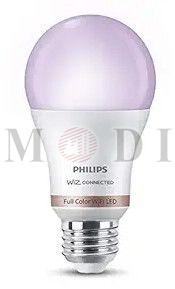
    Philips Wiz Smart Wi-Fi LED Bulb

    • MOQ100 piece
    • Brand NamePHILIPS
    • Number Of FlowerLED Bulb
    • Wattage10W
    • FeaturesDimmable, Tunable White, Millions Of Colors
    • Supply TypeSupplier, Trader
    • Preferred Buyer Location India only
    View More Details
    Send Enquiry

    Company Information

    • calendar Member Since 1 Year
    • building Nature of Business Supplier
    • gst icon GST No. 29AFPPM8816A1Z6

    Ask for more detail from the seller

    Contact Supplier
    Report incorrect details
    • Product Details

    • Company Details

    no_img_icon

    • Brand NamePHILIPS
    • Number Of FlowerLED Bulb
    • Wattage10W
    • Lifespan15,000 Hours
    • FeaturesDimmable, Tunable White, Millions Of Colors
    • Use CaseAmbient And Customizable Lighting
    • ConnectivityHome Wi-Fi
    • FunctionalitySmart Wi-Fi Enabled
    • ControlWiZ App, Voice Control (Alexa, Google Assistant)
    • InstallationSimple Screw-in, No Hub Required

    We offer the PHILIPS Wiz Smart Wi-Fi LED Bulb, a 10W LED bulb that is smart Wi-Fi enabled for seamless connectivity to your home network. Control the lighting with the WiZ App, featuring dimmable settings for customizable ambiance. Simple screw-in installation makes it easy to set up, with a lifespan of 15 years for long-lasting use. Perfect for creating ambient and personalized lighting in any space. Ideal for suppliers and traders looking to provide innovative lighting solutions to their customers.



    Interested in this product? Ask for more details & Latest Price from seller
    Send Enquiry
    Share your requirements for a quick response!
    Tell us what you need?

    Looking for Philips Wiz Smart Wi-Fi LED Bulb?

    Quantity
    Seller Contact Details
    To list your productBoost Your Business Visibility WorldwideRegister Now
    To list your productBoost Your Business Visibility WorldwideRegister Now
    Waiting for permission
    To search by voice, go to your browser settings and allow access to microphone

    Allow microphone access to search with voice