
Company Information
 Member Since 13 Years
 Nature of Business Supplier Year of Establishment 2012
Ask for more detail from the seller
Contact Supplier
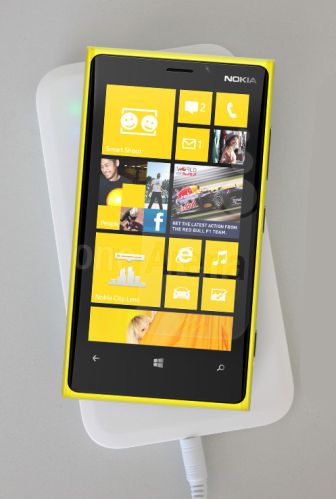
We are offeringQi Wireless Charger for Nokia Lumia Mobile Phone.
wireless charger charging pad charger for nokia lumia 920/ lumia 820/lg nexus 4/htc droid dna/samsung galaxy s iii/samsung not.
2012 newest qi wireless charger charging pad charger for nokia lumia 920/ lumia 820/lg nexus 4/htc droid dna/samsung galaxy s iii/samsung note 2 brand new factory
specification:
the brand new induction charger from mcpowerworks with all qi-enabled devices now and in the future.
(the qi name and the qi logo are both trademarks of the wireless power consortium)
features and functions
universal charging: the inductive charger has qi, the new universal standard for charging. You can charge any qi-enabled device today, tomorrow and beyond.
large qi charging zone: 1 large zone for wireless charging.
freedom of placement: no annoying magnets to align or secret spots to find in order to charge your device.
indicator lights: on when you’re charging, off when you’re full.
intelligent induction: prevents overcharging with standby mode once you’re fully charged.
usb port: charge a third device, with or without qi
power source: ac adaptor plugs into charging pad; no plugs needed for devices with qi-enabled sleeve or door.
technical specification for the qi inductive charger
input: direct current 19v1000ma
frequency: 100-200khz
wireless distance: 5mm
output: 5v 500ma-700ma
supported devices:
as of writing, this charger supports the following phones:
1. Nokia 920
2. Lg nexus 4
3. Htc droid dna
4. Samsung galaxy s iii (purchase of a qi wireless receiver is required)
5. Samsung galaxy note ii (purchase of a qi wireless receiver is required)
how should I go about setting up the charger?
1. Connect the power supply to the qi inductive charger using the power cable provided. Ensure that the connectors are firmly secured.
2. There will be an indicator light and a ‘beep’ sound from the qi inductive charger if the set up is successful.
how should do I start charging my qi enabled devices?
1. Place your phone on the qi inductive charger.
2. If there’s a green indication light from the charger, the phone is charging wirelessly. However, if there isn’t any green indicator light, move your device to the center of the charger. This should commence the charging process.
3. Kindly note that if the distance between the phone and qi inductive charger is more than 4cm, the phone may not charge. Should this happens, it’s advisable to remove the case on your phone to commence the charging process.
for more information, kindly refer to the youtube video below for more information.



Connect with us





 For Buyer
  For Seller
  Help
Help 
 Guangdong
  Send Enquiry