
Products / Services
  • Products / Services
  • Companies
  • Buy Leads
    Post Buy Requirement

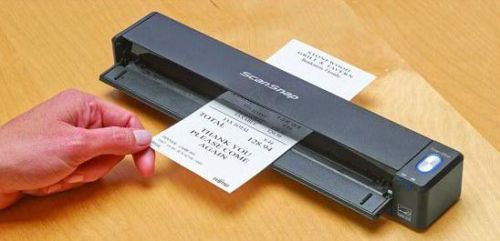
    Scansnap Series Image Scanner (iX100)

    • Supply TypeSupplier, Retailer
    • Preferred Buyer Location All over the world

    The Scansnap Series Image Scanner (iX100), delivered by us, works on both Mac and PC operating systems. The scanner can scan a colour document in 5.2 seconds and has built-in GI....
    View More Details
    Send Enquiry

    Company Information

    • calendar Member Since 14 Years
    • building Nature of Business Retailer
    • Year of Establishment 2010

    Ask for more detail from the seller

    Contact Supplier
    Report incorrect details
    • Product Details

    • Company Details

    no_img_icon

    The Scansnap Series Image Scanner (iX100), delivered by us, works on both Mac and PC operating systems. The scanner can scan a colour document in 5.2 seconds and has built-in GI microprocessor.


    Overview :

    • The ScanSnap iX100 - take scanning anywhere - The ScanSnap iX100 is the world's fastest battery powered ScanSnap. Whether scanning receipts, contracts, recipes, or plastic cards, the iX100 takes scanning beyond the desktop and into your mobile world. Completely wireless and weighing only 400 g, the iX100 brings mobility and wireless scanning to your PC or Mac as well as
      • Wi-Fi scanner for your Mac, PC or mobile device
      • One button searchable PDF creation
      • Scan a color document in 5.2 seconds
      • Battery powered
      • Built-in GI microprocessor
      • Scan wirelessly to a PC or Mac
      • Scan wirelessly to iOS or Android mobile device
      • Direct Connect mode for Wi-Fi scanning anywhere
      • Dual Scan - scan two small documents at the same time
      • Faster searchable PDF creation
      • More Quick Menu productivity


    Features :
    Easily Transform Paper with the Touch of a Button - Achieving organization with the ScanSnap iX100 starts with the touch of a single button and ends with a host of productivity features that keep you ahead of the stack.
    Scan to -

    • PDF
    • Searchable PDF
    • JPEG
    • Word (editable)
    • Excel (editable)
    • Business Cards
    • Mobile


    Available only when scanning to a computer :

    • Compact and Portable - At only 400 g (14.1 ounces), the ScanSnap iX100 provides portability and ease of use at your fingertips.
    • Wi-Fi or USB connectivity - The ScanSnap iX100 can automatically detect your Wi-Fi network at home, in the office or on the go. With Direct Connect mode you can scan wirelessly beyond your
    • Battery power - Scan up to 260 documents on a full charge and easily recharge using a USB charger.
    • Quick digitization - Scan 5.2 seconds per page even at 300 dpi in color!
    • Dual scan - Scan two small sized documents, such as business cards or receipts at the same time.
    • Auto two page stitching - Even charts and diagrams larger than A4 can be scanned. Just fold it in half, scan both sides and the iX100 will automatically stitch it back together.
    • Built-in "GI" microprocessor - A dual-core CPU mounted "GI" processor performs the intelligent image enhancement responsible for great looking images with dramatically faster results and more sophisticated connectivity.
    • Image processing: Automatic corrections and image output
    • Supports Wi-Fi: 2.4 GHz, WPS (Wi-Fi Protected Setup) wireless LAN (IEEE802.11b/g/n)
    • Compatible with PC or Mac - The ScanSnap iX100 works on both Mac and PC operating systems, making flexibility a breeze.
    • CardMinder Business Card Software - Scan, store, and edit business card information and even export data into applications like Address Book, Excel, and SalesForce.
    • ScanSnap Organizer - View, Manage and edit PDF and Jpg files scanned with ScanSnap on a Windows platform. Organize allows users to convert scanned PDF files into searchable content, embed custom keywords, attach to email or SharePoint and remain productive with paper work long after it is scanned.
    • ScanSnap Folder is only available on PC
    • Microsoft SharePoint is only available on PC
      • Evernote
      • Google Drive™
      • Salesforce
      • SugarSync
      • SharePoint (PC only) - "Limited version support"
    • Making ScanSnap Connect Application more convenient  - With ScanSnap Sync, whichever device you are on, you can use scanned data from either ScanSnap Organizer or the mobile app ScanSnap Connect Application. ScanSnap Sync automatically synchronizes scanned data between the two. This gives you more flexibility for data management regardless of your location.
    • ScanSnap Sync is realized by utilizing a third party cloud service such as Google Drive, OneDrive and Dropbox. For the latest support information of cloud services, please refer to each cloud vendor's website.
    • ScanSnap Receipt - A few simple steps to digitize and manage the information on your receipts
    • ScanSnap Receipt allows you to easily scan and extract information from your receipts, and export the data for other accounting software. The sophisticated features within ScanSnap Receipt automatically support various languages and currencies.
    • Warranty : Find out the details about your product's warranty and information on how to extend your warranty.


    Specifications

    Product NameScanSnap iX100
    General Technical Specifications
    Scanner TypeCDF (Continuous Document Feeding), Simplex sheetfeed two-way paper path
    (Straight path, U-turn path)
    Scanning ModesColor, grayscale, monochrome, automatic (color / grayscale / monochrome detection)
    Image SensorCIS (Contact Image Sensor) x 1
    Light Source3 Color LED (Red / Green / Blue)
    Optical Resolution600 dpi
    Scanning Speed (A4 portrait)(1)Auto Mode(2)5.2 seconds / page
    Normal Mode5.2 seconds / page
    Better Mode5.2 seconds / page
    Best Mode5.2 seconds / page
    Excellent Mode20.4 seconds / page
    Document Size(3)Normal ModeA4, A5, A6, B5, B6, Business Card, Post Card, Letter, Legal and Custom Size.
    Max: 216 X 360 mm (8.5 X 14.17 in.), Min: 25.4 x 25.4 mm (1 x 1 in.).
    Automatically recognizes document size.
    Normal Mode with Carrier SheetUse of a Carrier Sheet permits the scanning of A3, B4, 279.4 x 431.8 mm (11 x 17 in.) and photographs as well as the document sizes listed above.
    Long Paper Scanning(4)Max: 216 x 863 mm (8.5 x 34 in.) (300 dpi or less)
    Paper Weight (thickness)52.3 to 209.3 g/㎡, or 14 to 56 lb (Straight path)
    52.3 to 80 g/㎡, or 14 to 20 lb (U-turn path)
    Card: Portrait or Landscape (Straight path)
    Non-embossed 0.76 mm or less
    Embossed: 0.76 + 0.48 mm (ISO7810 Conforming)
    Paper SettingFront-side up
    Continuous Scanning260 sheets (A4, color, simples, 300 dpi, battery operated)(8)
    Interface(5)USB 2.0 (USB 1.1 compatible)
    Power SourceLi-ion Battery (3.7 V / 720 mAh)
    Power Requirement5 V / 0.5 A ( x 1port)
    Power Consumption(6)During operation: 4.7 W or less
    During sleep mode: 2.2 W or less
    During Standby (OFF) mode: Less than 0.5 W
    Operation EnvironmentTemperature5°C to 35°C (41°F to 95°F)
    Relative Humidity20 to 80% (non-condensing)
    Dimensions (W x D x H)(7)273 x 47.5 x 36mm (10.74 x 1.87 x 1.42 in.)
    Device Weight400 g (0.88 lb)
    Environmental ComplianceENERGY STAR® compliant/RoHS
    DriverScanSnap specific driver:
    • Windows®: Does not support Twain/ISIS®
    • Mac OS: Does not support Twain
    • Scanning speeds may vary due to the system environment used. Scanning speed measured from "start feeding document" to "finish output document" after pre-pick and pressing scan button (not including warm-up time). Warm-up time is less than 2 seconds (or less than 3 seconds from chute cover closed).
    • Documents measuring approximately 148 mm in length or less are scanned in "Best mode", while other documents are scanned in "Better mode".
    • Automatically stitch a two-page spread when scanning a folded A3, B4 or double letter size document one side at a time. The image is automatically stitched only if texts or diagrams cover across the two-page spread.
    • ScanSnap iX100 is capable of scanning documents that exceed A4 size in length. This function is available for all models except for 'Excellent mode'.
    • Computer with USB 3.0 will work as USB 2.0 guaranteed only with USB cable provided with product.
    • When operating with battery.
    • When chute is closed.
    • The number of sheets that can be scanned when connected to a computer via Wi-Fi with fully charged battery.
      The number of sheets may vary due to the system environment used, usage method and repeated charging.


    System Requirements For PC

    Compatible Operating Systems Windows®
    10
    (32-bit / 64-bit)(1)
    8 / 8.1
    (32-bit / 64-bit)(1)
    7
    (32-bit / 64-bit)
    Vista™
    (32-bit / 64-bit)
    SP2 or later
    Driver/Applications(2)ScanSnap Manager V6.5SupportedSupportedSupportedSupported
    ScanSnap Organizer V5.5SupportedSupportedSupportedSupported
    ScanSnap Receipt V1.5SupportedSupportedSupportedSupported
    CardMinder™ V5.2SupportedSupportedSupportedSupported
    ABBYY FineReader for ScanSnap™ 5.0SupportedSupportedSupportedSupported
    Scan to Microsoft SharePoint 3.4 / 5.0SupportedSupportedSupportedSupported
    Hardware Requirements(3)CPU(4)Intel® Core™ 2.5 GHz or higher
    Memory Capacity(4)4 GB or more
    Display1,024 × 768 pixels or higher;800 x 600 pixels or more
    Disk Capacity(5)2,690 MB or more of the free hard disk space
    DVD ROM DriveRequired for installation(6)
    USB Port(4)(7)USB 2.0 / USB 1.1
    • Operate as a desktop application.
    • Please refer to the ScanSnap website for latest support information.
    • The ScanSnap device may not work if the connected computer does not meet these requirements.
    • Scanning speeds may drop if recommended CPU, memory capacity and USB 1.1 requirements are not met.
    • Microsoft .NET Framework 3.5 SP1 will be installed (requires 500 MB of disk space) together with ScanSnap Manager, ScanSnap Organizer or CardMinder for systems that do not have .NET Framework 3.5 SP1 installed. When using “Scan to Google Drive” with ScanSnap Manager/ScanSnap Organizer, users also need to install either .NET Framework 4 or in-place updates of .NET Framework 4.
    • Operating systems listed in this table are the only ones supported. Please refer to the ScanSnap Support site for latest support information.
    • ScanSnap operates on both USB 2.0 and USB 3.0 without any difference in performance.
    • System requirements may change depending on the duration of support and the support policy of the companies that make the software listed in the table above.


    System Requirements For Mac

    Compatible Operating Systems OS X v10.10OS X v10.9(1)Mac OS X v10.8(2)Mac OS X v10.7(3)
    Driver/Applications(4)ScanSnap Manager for Mac V6.3SupportedSupportedSupportedSupported
    ScanSnap Organizer for Mac V1.1SupportedSupportedSupportedSupported
    ScanSnap Receipt for Mac V1.5SupportedSupportedSupportedSupported
    CardMinder™ for Mac V5.2SupportedSupportedSupportedSupported
    ABBYY FineReader for ScanSnap™ 5.0SupportedSupportedSupportedSupported
    Hardware Requirements(5)CPU(6)Intel® Core™ i5 2.5 GHz or higher
    Memory Capacity(6)4 GB or more
    Display1,024 x 768 pixels or higher
    Disk Capacity1,930 MB free hard disk space
    DVD-ROM DriveRequired for installation(7)
    USB port(6)(8)USB 2.0 / USB 1.1
    • OS X v10.9.5 or later recommended.
    • OS X v10.8.5 recommended.
    • Mac OS X v10.7.5 recommended.
    • Operating systems listed in this table are the only ones supported. Please refer to the ScanSnap Support site for latest information.
    • The ScanSnap device may not work if the connected computer does not meet this requirement.
    • Scanning speeds may drop if recommended CPU, memory capacity and USB 1.1 requirements are not met.
    • If you have no DVD-ROM drive, please visit the following website:http://scansnap.fujitsu.com/g-support/en/
    • ScanSnap operates on both USB 2.0 and USB 3.0 without any difference in performance.
    • System requirements may change depending on the duration of support and the support policy of the companies that make the software listed in the table above.

    Accessories

     Part NumberDescription
    ScanSnap iX100 Consumables
    F1 CleanerPA03950-0352100 ml bottle
    Used to clean rollers
    Cleaning WipesPA03950-04191 box of Cleaning Wipes
    ScanSnap iX100 Options
    AC adapterPA03010-6571
    USA, Canada and Taiwan
    Intended for ScanSnap iX100
    PA03010-6581
    EMEA, England
    PA03010-6591
    China
    PA03010-6601
    Korea
    PA03010-6611
    Australia
    PA03010-6621
    India
    PA03010-6631
    Brazil
    ScanSnap iX100 CasePA03688-0001Intended for ScanSnap iX100
    ScanSnap iX100 Soft CasePA03688-0011Intended for ScanSnap iX100
    ScanSnap Carrier SheetsPA03360-00135 Carrier Sheets
    Intended for ScanSnap iX100, iX500, S1500, S1500M, S1100i, S1100


    Share your requirements for a quick response!
    Tell us what you need?

    Looking for Scansnap Series Image Scanner (IX100)?

    Quantity
    Seller Contact Details
    To list your productBoost Your Business Visibility WorldwideRegister Now
    To list your productBoost Your Business Visibility WorldwideRegister Now
    Waiting for permission
    To search by voice, go to your browser settings and allow access to microphone

    Allow microphone access to search with voice




