
Products / Services
  • Products / Services
  • Companies
  • Buy Leads
    Post Buy Requirement

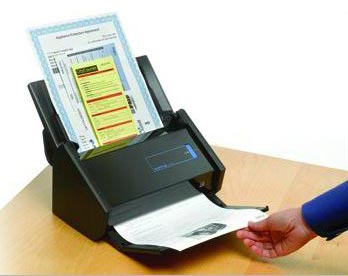
    Scansnap Series Image Scanner (iX500 Deluxe)

    • Supply TypeSupplier, Retailer
    • Preferred Buyer Location All over the world

    The Scansnap Series Image Scanner (iX500 Deluxe), offered by us, is procured from the reliable manufacturers after strict quality assurance. We are capable of delivering small or bulk orders of the....
    View More Details
    Send Enquiry

    Company Information

    • calendar Member Since 14 Years
    • building Nature of Business Retailer
    • Year of Establishment 2010

    Ask for more detail from the seller

    Contact Supplier
    Report incorrect details
    • Product Details

    • Company Details

    no_img_icon

    The Scansnap Series Image Scanner (iX500 Deluxe), offered by us, is procured from the reliable manufacturers after strict quality assurance. We are capable of delivering small or bulk orders of the Image Scanner on a timely basis.


    Overview :

    • The ScanSnap iX500 Deluxe provides PC users an effective way to greatly reduce paper clutter, storage space, and security risks associated with unmanaged paperwork at home or the office. For even greater accessibility and usefulness, users can now scan wirelessly to a PC or Mac as well as iOS or Android mobile devices.
      • One button searchable PDF creation
      • Advanced paper feeding system
      • Blazing 25ppm color scanning
      • 50-page Automatic Document Feeder (ADF)
      • Built-in GI microprocessor
      • USB 3.0 (or lower)
      • Scan wirelessly to a PC or Mac
      • Scan wirelessly to iOS or Android mobile devices
      • Comes with Adobe® Acrobat® Standard
      • Faster searchable PDF creation
      • More Quick Menu Productivity
    • Additionally, the ScanSnap iX500 Deluxe Bundle comes with Rack2-Filer Smart For Windows® users, Rack2-Filer Smart is a feature-rich scanning and content viewing application incorporating an ultra-intuitive bookcase and binder interface that gives users a familiar and enjoyable interaction with their scanned paperwork
      • Scan PDF and JPG files directly into binders
      • Drag binders from one cabinet to another
      • Apply pictures to make binders distinctive
      • Flip through pages or jump to a section
      • Create divider sheets for organizing content
      • Use the highlighter tool with color palette
      • Attach digital sticky notes to pages
      • Easily highlight and stamp pages
      • OCR binders to search by keyword or phrase
      • Use magnification tool to see finer details
      • Select ImageWriter to print content into binder


    Features :

    • Easily Transform Paper with the Touch of a Button - Achieving organization with the ScanSnap iX500 starts with the touch of a single button and ends with a host of productivity features that keep you ahead of the stack.
      Scan to -
      • PDF
      • Searchable PDF
      • JPG
      • Word (editable)
      • Excel (editable)
      • Business Cards
      • Mobile
    • Wi-Fi or USB connectivity to a computer - Break free from USB and place ScanSnap just about anywhere in the room with Wi-Fi connectivity to a PC or Mac*
    • May require latest online updates. Requires use of an existing wireless router. Only one computer can be registered for Wi-Fi connection
    •  Scan Directly to Mobile Devices - Quickly bypass the computer altogether and scan
    • a PDF or JPEG file directly to an iOS or Android mobile device or tablet*
    • See list of supported devices http://scansnap.fujitsu.com
    • Typically, higher quality means lower performance, but the iX500 maintains a double sided scanning speed of up to 25 pages per minute even at 300 dpi in Color!
    • Built-in "GI" microprocessor - A dual-core CPU-mounted "GI" processor performs the intelligent image enhancement responsible for great looking images with dramatically faster results and more sophisticated connectivity:
    • Image processing: Automatic corrections and image output
    • Supports Wi-Fi:WPS (Wi-Fi Protected Setup) wireless LAN (IEE802.11b/g/n)
    • Supports USB 3.0
    • Inheriting the superior paper feeding technology of our professional-grade scanners, iX500 achieves exceptional feeding reliability using "Separation Roller" technology to minimize jams and multi-feeds.
    • Advanced Paper Detection - ScanSnap iX500 is equipped with an ultrasonic sensor that can be turned on to help operators avoid losing images. What's more, an interactive interface allows users to easily bypass intentional double-feed such as a taped-receipt on an expense report.
    • Making PDF files searchable at the point of scanning is a great way to keep them instantly accessible and now you can create a searchable PDF at nearly the same speed as a standard PDF.
    • Rack2-Filer Smart - The ScanSnap iX500 Deluxe Bundle includes Rack2-Filer Smart, an ultra-intuitive scanning and file management application for your home or small business. With Rack2-Filer Smart you can easily view, manage and organize your documents into e-binders for easy archiving.
    • ScanSnap Organizer - View, manage, and edit PDF and JPEG files scanned with ScanSnap on a Windows platform. Organizer allows users to convert scanned PDF files into searchable content, embed custom keywords, attach to email or SharePoint®, and remain productive with paperwork long after it is scanned.
    • CardMinder Business Card Software - ScanSnap iX500 also quickly scans loads of business cards, extracts the contact information, and places it into editable fields that can be exported to Outlook.
      Scan to:
      • Evernote
      • Dropbox
      • Google Drive™
      • Salesforce
      • SugarSync
      • SharePoint (PC only)
    • Making ScanSnap Connect Application more convenient - With ScanSnap Sync, whichever device you are on, you can use scanned data from either ScanSnap Organizer or the mobile app ScanSnap Connect Application. ScanSnap Sync automatically synchronizes scanned data between the two. This gives you more flexibility for data management regardless of your location.
      canSnap Sync is realized by utilizing a third party cloud service such as Google Drive, OneDrive and Dropbox. For the latest support information of cloud services, please refer to each cloud vendor's website.
      ScanSnap Receipt - A few simple steps to digitize and manage the information on your receipts
      ScanSnap Receipt allows you to easily scan and extract information from your receipts, and export the data for other accounting software. The sophisticated features within ScanSnap Receipt automatically support various languages and currencies.
    • Warranty : Find out the details about your product's warranty and information on how to extend your warranty.


    Specifications

    Product NameScanSnap iX500
    General Technical Specifications
    Scanner typeAutomatic Document Feeder (ADF), Duplex Scanning
    Scanning ModesColor, Grayscale, Monochrome, Automatic (color / grayscale / monochrome detection(3))
    Image SensorColor CIS (Contact Image Sensor) x 2 (front / back)
    Light Source3 Color LED (Red / Green / Blue)
    Optical Resolution600 x 600 dots per inch (dpi)
    Scanning Speed (A4 portrait)(1)Auto mode(2)Simplex or Duplex, 25 pages per minute (ppm)
    Normal modeColor & Grayscale 150 dpi, Monochrome 300 dpi, Simplex/Duplex, 25 ppm
    Better modeColor & Grayscale 200 dpi, Monochrome 400 dpi, Simplex/Duplex, 25 ppm
    Best modeColor & Grayscale 300 dpi, Monochrome 600 dpi, Simplex/Duplex, 25 ppm
    Excellent mode(3)Color & Grayscale 600 dpi, Monochrome 1200 dpi, Simplex/Duplex, 7 ppm
    Document SizeNormal Mode without Carrier SheetA4, A5, A6, B5, B6, Business Card, Post Card, Letter, Legal and Custom Size.
    Max: 216 mm X 360 mm (8.5 in. X 14.17 in.), Min: 50.8 mm X 50.8 mm (2 in. X 2 in.).
    Automatically recognizes document size.
    Normal Mode with Carrier Sheet(3)Use of a Carrier Sheet permits the scanning of A3, B4, 279.4 mm X 431.8 mm (11 in. x 17 in.) and photographs as well as the document sizes listed above.
    Long Paper Scanning(3)(4)863 mm (34 inches in length)
    Multi-feed DetectionSupported (Standard) ultrasonic multi-feed detection sensor
    Paper Weight (thickness)40 g/m2 to 209 g/m2 (11 lb. to 56 lb.)
    Paper Chute Capacity(5)Maximum 50 sheets (A4, 80g/m2 or 21 lb. )
    InterfaceUSB 3.0 (USB 2.0 / 1.1 Compatible)(6)
    Wi-Fi Interface(7)Observed StandardsIEEE802.11b / IEEE802.11g / IEEE802.11n
    Communication ModeInfrastructure Mode
    Frequency(8)2.412 GHz to 2.462 GHz / 2.412 GHz to 2.472 GHz
    Communication distanceIndoors, 50 m (Recommended: indoors, within 25 m)
    *May vary depending on surrounding environment and the access point to be connected
    Security(9)WPA-PSK (TKIP / AES), WPA2-PSK (TKIP / AES),
    WEP (64-bit / 128-bit)
    Easy InstallationWPS2.0 supported (button / PIN code)
    Power RequirementAC Adapter AC 100 V to 240 V, 50 / 60 Hz
    Power Consumption / USB connectedOperating Mode20 W or less
    Standby Mode1.6 W or less (Wi-Fi Switch Off)
    Power Consumption / Wi-Fi connectedOperating Mode20 W or less
    Standby Mode2.5 W or less
    Operation EnvironmentTemperature5 °C to 35 °C (41 °F to 95 °F)
    Relative humidity20 % to 80 % (non-condensing)
    Dimensions (W x D x H)(10)292 mm x 159 mm x 168 mm (11.5 in. x 6.2 in. x 6.6 in.)
    Device Weight3.0 kg (6.62 lb.)
    DriverSpecific driver:
    · Windows®: Does not support Twain/ISIS®
    · Mac OS: Does not support Twain
    Environmental ComplianceENERGY STAR® V.2 compliant / ROHS(11) / EPEAT Silver Compliant
    Inbox ContentsScanSnap, AC cable, AC adapter, USB cable (USB 3.0 supported), Safety Precautions, Setup DVD-ROM, Nuance® PowerPDF Standard DVD-ROM, ScanSnap Carrier Sheet, Rack2-Filer Smart
    • Scanning speeds may vary due to the system environment used
    • Documents measuring 148 mm (5.8 inches) in length or less are scanned in "Best Mode", while other documents are scanned in "Better Mode".
    • Only Computer connection
    • ScanSnap iX500 is capable of scanning documents that exceed A4 size in length. ScanSnap iX500 supports the scanning of longer documents in all modes except in “Excellent Mode”
    • Maximum capacity varies depending upon paper weight.
    • Some computers do not recognize the ScanSnap when it is connected to a USB 3.0 port. In this case, please use a USB 2.0 port
    • Mobile devices that can be connected include iPad / iPhone / iPod touch and Android™. Refer to ScanSnap website for details
    • Values depends on Country
    • IEEE802.1X Authentication is not supported
    • Excluding the stacker and other external attachments
    • PFU LIMITED, a Fujitsu company, has determined that this product meets RoHS requirements (2002/95/EC).


    System Requirements For PC

    Compatible
    Operating
    Systems
     Windows®
    10
    (32-bit / 64-bit)(1)
    8/8.1
    (32-bit / 64-bit)(1)
    7
    (32-bit / 64-bit)
    SP1 or later
    Vista®
    (32-bit / 64-bit)
    SP2 or later
    XP
    (32-bit)
    SP3 or later
    Interface
    /Applications(2)
    ScanSnap Manager V6.5SupportedSupportedSupportedSupportedSupported
    ScanSnap Organizer V5.5SupportedSupportedSupportedSupportedSupported
    ScanSnap Receipt V1.5SupportedSupportedSupportedSupportedNot supported
    CardMinder™ V5.2SupportedSupportedSupportedSupportedSupported
    ABBYY FineReader for ScanSnap™ 5.0SupportedSupportedSupportedSupportedSupported
    Scan to Microsoft® SharePoint® 3.4 / 5.0SupportedSupportedSupportedSupportedSupported
    Nuance® Power PDF StandardPlease refer to the website of Nuance Communications, Inc. for the latest support information
    Hardware
    Requirements(3)
    CPU(4)Intel® Core™ 2 Duo 2.2 GHz or higher (Recommended: Intel® Core™ i5 2.5 GHz or higher)
    Memory Capacity(4)64-bit: 2 GB or more (Recommended: 4 GB or more)
    32-bit: 1 GB or more (Recommended: 4 GB or more)
    Display1,024 × 768 pixels or higher;
    800 x 600 pixels or more
    Disk Capacity(5)4.5 GB free hard disc space for installation
    DVD ROM DriveRequired for installation(6)
    USB Port(4)(7)USB 3.0(8) / USB 2.0 / USB 1.1
    • Operate as a desktop application.
    • Please refer to the ScanSnap website for latest support information.
    • The ScanSnap device may not work if the connected computer does not meet these requirements.
    • Scanning speeds may drop if recommended CPU, memory capacity and USB 1.1 requirements are not met.
    • Microsoft .NET Framework 3.5 SP1 will be installed (requires 500 MB of disk space) together with ScanSnap Manager, ScanSnap Organizer or CardMinder for systems that do not have .NET Framework 3.5 SP1 installed. When using “Scan to Google Drive” with ScanSnap Manager/ScanSnap Organizer, users also need to install either .NET Framework 4 or in-place updates of .NET Framework 4.
    • Operating systems listed in this table are the only ones supported. Please refer to the ScanSnap Support site for latest support information.
    • ScanSnap operates on both USB 2.0 and USB 3.0 without any difference in performance.
    • Some computers do not recognize the ScanSnap when it is connected to a USB 3.0 port. In this case, please use a USB 2.0 port.
    • *System requirments may change depending on the duration of support and the support policy of the companies that make the software listed in the table above.


    Rack2-Filer Smart V1.0 / Magic Desktop V1.0 System Requirements

    Compatible operating systems Windows®
    10 (32-bit / 64-bit)(4)8/8.1 (32-bit / 64-bit)(4)7 32-bit / 64-bit)(5)Vista® (32-bit / 64 bit)(6)XP (32-bit)(7)
    Hardware RequirementsCPUIntel® Pentium® 4 1.8 GHz or higher (Recommended: Intel® Core™ 2 Duo 2.2 GHz or higher)
    Memory Capacity2 GB or more (Recommended: 4 GB or more)
    Display1,024 x 768 pixels or higher
    Disk CapactitySystem Drive(8)------64-bit: 2 GB or more64-bit: 2 GB or more------
    System Drive------32-bit: 850 MB or more
    Installation Drive1GB or more disc space* for each software
    *Additional space is required for the data created by Rack2-Filer Smart and Magic Desktop
    Supported scannersScanSnap SV600, iX500, S1500, S1300i, S1300, S1100
    Supported mobile devicesModeliPad series, iPhone series (4 or later), iPod touch series (4th generation or later)
    OSiOS 4.3 or later
    ApplicationRack2-Filer Smart for iOS1.1.0 or later
    • This product only supports Microsoft® Windows®
    • Please refer to the the Rack2-Filer Smart Website and the Magic Desktop Website
    • When installing Magic Desktop, Internet connection is required
    • Rack2-Filer Smart and Magic Desktop runs as a desktop application
    • For use with Service pack 1 or higher
    • For use with Service pack 2 or higher
    • For use with Service pack 3 or higher
    • This is the free capacity required when .NET Framework 4 is not installed

    Accessories

     Part NumberDescription
    ScanSnap iX500 Consumables(1)
    Roller SetPA03656-0001Lifetime: Every 200,000 sheets or one year
    (For ScanSnap iX500 only)
    Cleaner F1PA03950-0352100 ml bottle
    For use on the Brake roller and Pick roller
    Cleaning WipePA03950-04191 pack (24 sheets)
    For use on the Brake roller and Pick roller
    ScanSnap iX500 Options
    ScanSnap Carrier Sheets(2)PA03360-00135 Carrier Sheets
    Intended for ScanSnap iX500, S1500, S1500M, S510, S510M, S500, S500M and ScanSnap fi-5110EOX Series scanners
    ScanSnap BagPA03951-0651Intended for ScanSnap iX500, S1500, S1500M, S510, S510M, S500, S500M and ScanSnap fi-5110EOX series scanners and included items
    • These recommended lifetimes are for 80 g/m2 (21 lb) A4 sized documents. Therefore, appropriate replacement lifetimes may vary for other document types.
    • Although ScanSnap Carrier Sheets have a listed lifespan of 500 scans, the lifespan may vary with usage. ScanSnap Carrier sheets are intended to scan paper documents with weights of 127 g/m2 (34 lb.) or less. They also support the scanning of folded documents that are as large as 216 mm x 297 mm (8.5 in. x 11.69 in.).


    Share your requirements for a quick response!
    Tell us what you need?

    Looking for Scansnap Series Image Scanner (IX500 Deluxe)?

    Quantity
    Seller Contact Details
    To list your productBoost Your Business Visibility WorldwideRegister Now
    To list your productBoost Your Business Visibility WorldwideRegister Now
    Waiting for permission
    To search by voice, go to your browser settings and allow access to microphone

    Allow microphone access to search with voice




