Write a Review
Our Products
We offer a complete product range of Voltage Monitoring Relay Three Phase and Automatic Voltage Regulating Relay (AVR)
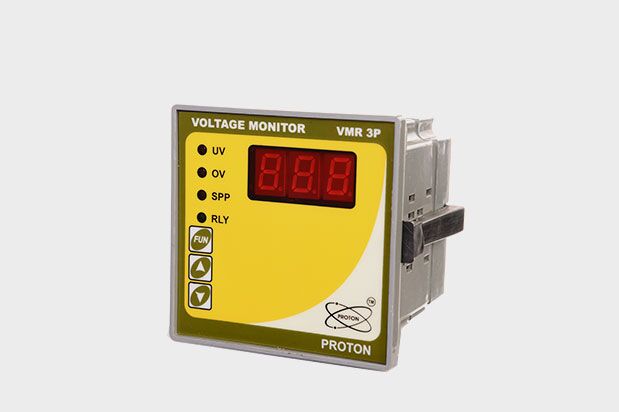
Protection of 3 Phase devices against Over voltage, Under voltage, Single Phasing, Reverse Phasing & unbalance supply are one of the major issue in electrical systems. For safe running of 3-phase devices, special protections that keep a continuous watch on supply conditions are very essential. The major cause of maximum load burn-out is overloading which occurs due to unbalance supply, Single Phasing & Reverse Phasing conditions. VMR3P detects such Conditions & protect the load from burn out. 'PROTON's VMR 3P' offer above protections along with 3 digit display showing R-Y, Y-B, B-R voltages in scanning mode with precise accuracy. LOW/HIGH voltage tripping to ensure trouble free running of 3-phase Loads.
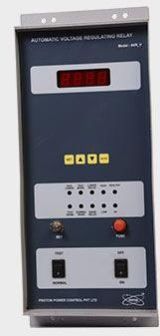
The AVR controller is a state of the art microcontroller technology based voltage regulating relay product form Proton. The AVR controller has the complete operating logic of the processes preprogrammed.
The operating mode can be selected using TEST or NORMAL Mode front panel Switch:
> In this mode the AVR is operational. If PT input voltage is less than PT set point voltage minus hysteresis, then HIGH LED glow & there is a pulse of LOWER RELAY as per user setting pulse time & delay between two pulses & it clears if PT input voltage is greater than or equal to PT set point
> If PT input voltage is greater than PT set point voltage plus hysteresis, then LOW LED glow & there is a pulse of RAISE RELAY as per user setting pulse time & delay between two pulses, & it clears if PT input voltage is less than or equal to PT set point .
> If PT input voltage is less than UV set point then UV relay on & UV LED glow & it clears if PT input voltage is greater than or equal to UV set point plus hysteresis.
> In TEST mode there is one potentiometer at front side of unit, it is independent of PT supply.
As per Potentiometer value voltage , Test Low & Test High LED glows as per PT voltage set point.
> To enter settings mode press set key and then press increment key for enter the correct password.
> The password value can be set by using INC or DEC key & then press ENT key.
> Press set key to move to next parameter. To edit parameter press increment/decrement keys
> To save and exit SET mode press ENT key.
> If no key is pressed then controller automatically goes to initial Display normal mode.
> The factory set password is 11.
 Proton Power Control Pvt Ltd (Proton Power Control Pvt Ltd)
 S. No. 28, Jagtap Dairy, Pimple Nilakh, - , , Pune, Maharashtra - 411027, India
 Share us via