
Company Information
 Member Since 14 Years
 Nature of Business Retailer
Ask for more detail from the seller
Contact Supplier
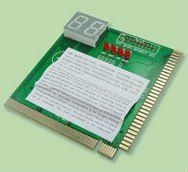
This card is named POST (Power on Self Test) card
It could display the error code by the result of Post, then you would soon determine the error in error code table.
Especially when the PC can't boot operating system, or blank screen, or the card and motherboard couldn't issue an audible beep.
It is a powerful diagnostic tool.
Remember to power off the computer motherboard; insert the card into the slot you want to use either ISA or PCI.
Power on your PC, The first thing to look at is the LEDS across the TOP, and refers to the manual for any error.
If you want to test the parts like video cards, modem, NIC one by one on your computer, take all PCI cards like video, modem, NIC off from your mother board , add the PC diagnostic card with one device at a time and turn on the computer, watch for the visual and beep code and reference the error code with the manual.
Package includes:
PC Analyzer Diagnostic POST CARD
English manual



 1,000 / Piece

Connect with us





 For Buyer
  For Seller
  Help
Help 
 Anna Salai, Chennai, Tamil Nadu
  Send Enquiry