
Company Information
 Member Since 17 Years
 Nature of Business Retailer
Ask for more detail from the seller
Contact Supplier
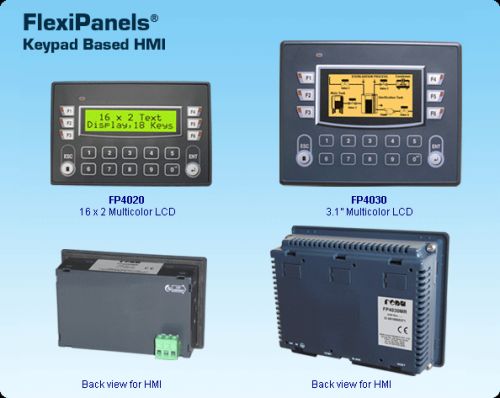
| 16 x 2 Text and 3.1” Graphical / Multicolor Backlight LCD Display | |
Floating point support, Bar graph, Built-in RTC | |
Ladder editor with powerful instruction set | |
| Support for Recipes | |
| Communication Ports: One serial port to connect PLC at RS232 / 422 / 485 levels / Printer / Progamming Port One USB (device) port as Programming Port | |
| User defined Function keys to support various tasks | |
| Alarms (Real Time & Historical) | |
| Multilanguage (Unicode) support with true type Windows® fonts for graphical model | |
| IP66 design. CE, UL approved. RoHS compliant | |
| Common Programming software for the entire FlexiPanels® family.........FREE!! |
The FlexiPanels® support Operator interface features. The user can also implement logic, specific to application using standard Ladder programming. A PLC logic block can be executed at power up, during every scan or upon a timer interrupt. The FlexiPanels® operator interface functions revolve around Screens and Tasks that can be assigned to screens and application.
Function Keys
FlexiPanels® HMIs are available with function keys and Numerical keypad for easy data entry. The Function keys also have built-in LEDs. These function keys are screen dependent Function Keys. User can assign any application related task / actions to these function keys.
Alarms
Real time and historical Alarms can be defined in FlexiPanels®. User-friendly Alarm object can be defined on the display. Alarms can be real time or historical. Keys can be assigned to acknowledge Alarm, view and scroll.
Recipes
Recipes data is stored in the FlexiPanels® memory. With one button stroke, a set of data can be downloaded to the PLC. Once in the local memory, the recipes data can be edited using simple data entry objects.
Bitmaps / Wizards
Different bitmaps can be embedded on the FlexiPanels® screen (Graphical Model). Bitmaps can be imported into the application and displayed on the FlexiPanels® screens. In addition, several wizards are supported to create commonly used objects such as Analog meters, Lamps, Buttons and Bar graphs.
Ladder Support
FlexiPanels® support ladder functionality. User can define logic in the unit using FlexiSoft® software. The execution of ladder could be through communication port or through I/O. Only HMI version of FlexiPanels® also support ladder functionality. It is used for critical applications where data is processed before sending it to controller. The execution of ladder logic is in microseconds. Ladder monitoring for debugging is also supported in FlexiPanels® configuration software.
Multilanguage / Unicode Support
All the languages are supported in the FlexiPanels® (Graphical Model). The user can now display messages, alarms in any regional / local language. All Windows® fonts can also be used for text in an application.
Communication Ports
Function Keys based FlexiPanels® have one serial communication port. The serial port can be used for programming of FlexiPanels®, printing screens (alphanumeric data), connecting to third party serial devices (barcode readers, temp scanners etc.) or to connect to a PLC or drive. User can configure serial port for Rs232 or RS485 communication.
Configuration Software
FlexiSoft® is a compact, Windows® based software to configure the FlexiPanels® units.
User friendly configuration tools and easy approach, helps user create applications quickly and easily.
| Product | Model | Display | LCD Life at 25oC | Key | Memory | PLC | Screen | Serial Ports | USB | RTC | Power Consumption | Weight (Approx.) |
| FP4020 | FP4020MR | 16x2 Text Multicolor backlight | 40000 hrs | 18 | Up-to 512 k | 10 k | Up-to 84 kB | 1 | Device | Yes | 2 W | 172 gms. |
| FP4030 | FP4030MR | 128x64 Graphical Multicolor backlight | 30000 hrs | 18 | Up-to | 10 k | Up-to 1 MB | 1 | Device | Yes | 3 W | 255 gms. |



Connect with us





 For Buyer
  For Seller
  Help
Help 
 Baner, Pune, Maharashtra
  Send Enquiry