
Company Information
 Member Since 17 Years
 Nature of Business Retailer
Ask for more detail from the seller
Contact Supplier
| Features | |
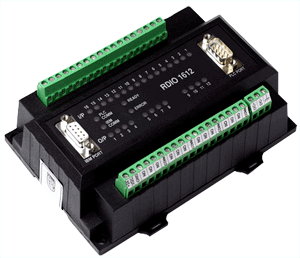
| DIN rail or panel mounted compact Digital I/O module | |
| Direct connection to PLC programming port | |
| Direct connection as Modbus Slave on RS485 network or RS232 link | |
| Up-to 32 digital inputs and 32 digital outputs | |
| Dual serial ports for connection of programming terminal / Operator Interface or SCADA | |
| LED indication for each I/O | |
| Diagnostic indication for communication and power | |
| Common programming software for the entire RDIO family.........FREE!! | |
| CE marked with optional UL certification | |
| Basic RDIO Operations |
| Function The RDIO series products add digital capability to your PLC / SCADA. Models are available that offer upto 32 digital inputs and upto 32 digital outputs to the PLC / SCADA. The configuration is done using the setup software. The digital inputs and outputs are isolated from the host device. RDIO has two communication ports. One port is used to connect to the PLC and second port can be used to connect an Operator Interface such as one of the Prizm series products or an IBM PC to configure the RDIO. The communication between the RDIO and PLC is optimized for speed to allow fast data transfer. PLC Communication The setup software defines the block of PLC registers used for communication. Register words are used for tracking inputs and outputs. Data is either sent to the specified register in the PLC or received from the register designated as Output register. The unit scans PLC registers continuously and evaluates the outputs. RTU Mode The RDIO can also be configured as Modbus RTU useful for data acquisition. The Modbus protocol allows the user to use off the shelf SCADA software such as ASTRA and other host devices. The unit offers RS232 as well as RS485 hardware layers. Digital I/Os The I/Os are isolated and in case of outputs separate ground can be made available for each output. The Unit has LED indication for each I/O. The unit is configured using the Windows based setup software. This will define the desired parameters for the unit like the inputs and outputs to be used, PLC registers, etc. |



Connect with us





 For Buyer
  For Seller
  Help
Help 
 Baner, Pune, Maharashtra
  Send Enquiry