Write a Review
Our Products
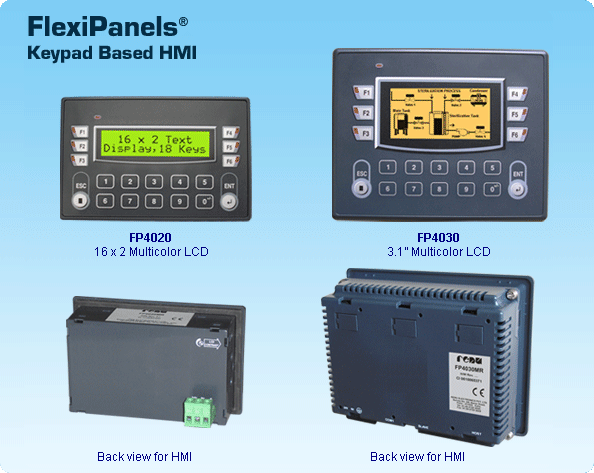
We are leaders in the market for providing best range of FP3 Series HMI with I/Os Touch Screen Based Flexi Panels, Keypad Based HMI Pluggable I/O Flexi Panels, Keypad Based HMI Flexi Panels, RDIO Remote Digital I/O Modules and Energy Measurement Module
| 16 x 2 Text and 3.1 Graphical / Multicolor Backlight LCD Display | |
| Floating point support, Bar graph, Built-in RTC | |
| Ladder editor with powerful instruction set | |
| Support for Recipes | |
| Communication Ports:One serial port to connect PLC at RS232 / 422 / 485 levels / Printer / Progamming PortOne USB (device) port as Programming Port | |
| User defined Function keys to support various tasks | |
| Alarms (Real Time & Historical) | |
| Multilanguage (Unicode) support with true type Windowsfonts for graphical model | |
| IP66 design. CE, UL approved. RoHS compliant | |
| Common Programming software for the entire FlexiPanelsfamily.FREE!! |
The FlexiPanelssupport Operator interface features. The user can also implement logic, specific to application using standard Ladder programming. A PLC logic block can be executed at power up, during every scan or upon a timer interrupt. The FlexiPanelsoperator interface functions revolve around Screens and Tasks that can be assigned to screens and application.
Function Keys
FlexiPanelsHMIs are available with function keys and Numerical keypad for easy data entry. The Function keys also have built-in LEDs. These function keys are screen dependent Function Keys. User can assign any application related task / actions to these function keys.
Alarms
Real time and historical Alarms can be defined in FlexiPanels. User-friendly Alarm object can be defined on the display. Alarms can be real time or historical. Keys can be assigned to acknowledge Alarm, view and scroll.
Recipes
Recipes data is stored in the FlexiPanelsmemory. With one button stroke, a set of data can be downloaded to the PLC. Once in the local memory, the recipes data can be edited using simple data entry objects.
Bitmaps / Wizards
Different bitmaps can be embedded on the FlexiPanelsscreen (Graphical Model). Bitmaps can be imported into the application and displayed on the FlexiPanelsscreens. In addition, several wizards are supported to create commonly used objects such as Analog meters, Lamps, Buttons and Bar graphs.
Ladder Support
FlexiPanelssupport ladder functionality. User can define logic in the unit using FlexiSoftsoftware. The execution of ladder could be through communication port or through I/O. Only HMI version of FlexiPanelsalso support ladder functionality. It is used for critical applications where data is processed before sending it to controller. The execution of ladder logic is in microseconds. Ladder monitoring for debugging is also supported in FlexiPanelsconfiguration software.
Multilanguage / Unicode Support
All the languages are supported in the FlexiPanels(Graphical Model). The user can now display messages, alarms in any regional / local language. All Windowsfonts can also be used for text in an application.
Communication Ports
Function Keys based FlexiPanelshave one serial communication port. The serial port can be used for programming of FlexiPanels, printing screens (alphanumeric data), connecting to third party serial devices (barcode readers, temp scanners etc.) or to connect to a PLC or drive. User can configure serial port for Rs232 or RS485 communication.
Configuration Software
FlexiSoftis a compact, Windowsbased software to configure the FlexiPanelsunits.
User friendly configuration tools and easy approach, helps user create applications quickly and easily.
| Product | Model |
Display |
LCD Life at 25oC |
Key |
Memory |
PLC |
Screen |
Serial Ports |
USB |
RTC |
Power Consumption |
Weight (Approx.) |
| FP4020 | FP4020MR |
16x2 Text Multicolor backlight |
40000 hrs | 18 |
Up-to 512 k |
10 k |
Up-to 84 kB |
1 | Device | Yes | 2 W | 172 gms. |
| FP4030 | FP4030MR |
128x64 Graphical Multicolor backlight |
30000 hrs | 18 |
Up-to |
10 k |
Up-to 1 MB |
1 | Device | Yes | 3 W | 255 gms. |
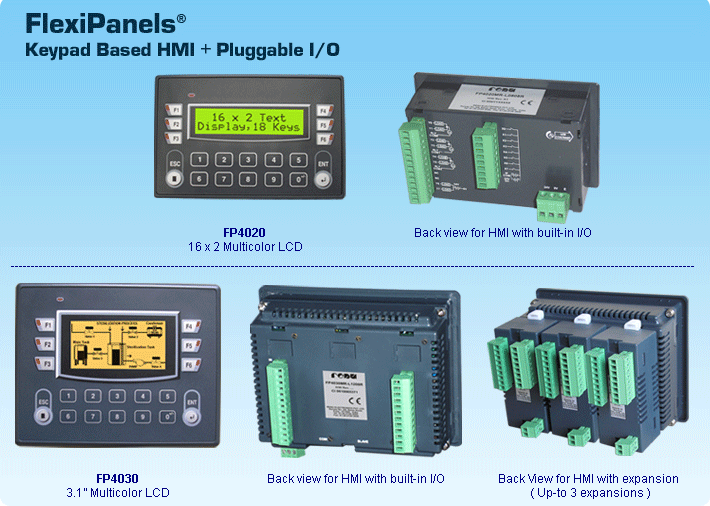
| Features | |
| 16 x 2 Text and 3.1 Graphical / Multicolor Backlight LCD Display | |
| Floating point support, Bar graph, Built-in RTC | |
| Integrated / Pluggable Digital and Analog Inputs and Outputs | |
| Digital Outputs - OC / Relays | |
| Analog Inputs for RTD, mV, mA, Thermocouple, 0 to 5 VDC, 0 to 10 VDC, -10 to +10VDC | |
| Analog Outputs are 4-20 mA / 0-10 VDC | |
| High Speed Counters and Timers | |
| Support for Quadrature inputs and PWM output | |
| Ladder editor with powerful instruction set | |
| Support for Recipes | |
| Communication Ports:One serial port to connect PLC at RS232 / 422 / 485 levels / Printer / Progamming PortOne USB (device) port as Programming Port | |
| User defined Function keys to support various tasks | |
| Alarms (Real Time & Historical) | |
| Multilanguage (Unicode) support with true type Windowsfonts for graphical model | |
| IP66 design. CE, UL approved. RoHS compliant | |
| Operations |
| The FlexiPanelssupport Operator interface features. The user can also implement logic, specific to application using standard Ladder programming. A PLC logic block can be executed at power up, during every scan or upon a timer interrupt. The FlexiPanelsoperator interface functions revolve around Screens and Tasks that can be assigned to screens and application. Integrated Digital I/OFP4030MR-L1208R model can have up-to 12 digital Inputs integrated to the unit. Digital inputs are high impedance 24 VDC. The unit can also have up-to 08 digital outputs. Outputs are 06 relays + 02 transistor outputs (NPN). Pluggable I/O (Digital)FlexiPanelshave facility to support I/O using pluggable I/O modules. The I/O modules can be selected based on the application requirement. Each high speed I/O module can support 4 nos. of high speed inputs of 25KHz. Quadrature input of up-to 20KHz is also supported. Each high speed I/O Module can support 1 quadrature input of 20KHz or 2 quadrature inputs of 5KHz. Each high speed I/O Module can support up-to 2 PWM outputs of 10KHz. Up-to 3 I/O modules can be connected to FP4030MR-E model. Analog I/OFP4030MR-E supports pluggable Analog I/O Modules. FlexiPanelscan have up-to 24 Analog inputs and / or 6 Analog outputs. The Analog inputs are 0-5 VDC, 0-10 VDC, 4-20 mA, mV, TC, RTD, - 10 to + 10 VDC and Analog outputs are 4-20mA / 0-10VDC. User can Plug only Analog I/O modules or use them in combination with Digital I/O. The execution of ladder logic is in microseconds. Ladder monitoring for debuggingis also supported in FlexiPanelsconfiguration software. |
| I/O Instructions | |||||
| • | NO contact | • | NC contact | • | Output |
| • | Falling Edge | • | Rising Edge | • | Inverter |
| • | Inverter Coil | • | Positive Pulse Contact | • | Negative Pulse Contact |
| • | Positive pulse coil | • | Negative Pulse Coil | ||
| Data Transfer | |||||
| • | MOV word | • | MOV DWORD | • | Invert Transfer |
| • | Table Initialize | • | Table Block Transfer | • | Table Invert Transfer |
| • | Data Exchange | • | Multiplexer | • | Demultiplexer |
| Math | |||||
| • | Addition | • | Subtraction | • | Multiplication |
| • | Division | • | Addition with Carry | • | Subtraction with Carry |
| • | Increment | • | Decrement | ||
| Compare | |||||
| • | Greater than | • | Greater than or equal | • | Equal |
| • | Not Equal | • | Less Than | • | Less than or Equal |
| Logic | |||||
| • | AND | • | OR | • | XOR |
| • | Shift | • | Rotate | ||
| Data Conversion | |||||
| • | Hex to Ascii | • | Ascii to Hex | • | Absolute Value |
| • | 7 segment decode | • | Ascii conversion | • | Binary Conversion |
| • | BCD conversion | • | 2's complement word | ||
| • | 2's complement Double word | ||||
| Timer | |||||
| • | TON | • | TOFF | • | TSS |
| Counter | |||
| • | Up counter | • | UP Down Counter |
| Program Control | |||||
| • | Subroutine CALL | • | Subroutine RET | • | For |
| • | Next | • | Master Control Set | • | Master Control Reset |
| • | Jump Control Set | • | Jump Control Reset | • | En Intr |
| • | Dis Intr | • | DT | • | Step sequence Init |
| • | Step sequence Input | • | Step sequence output | ||
| Function | |||||
| • | Moving Average | • | Digital Filter | • | PID1,4 |
| • | Upper limit | • | Lower limit | • | Maximum Value |
| • | Minimum Value | • | Average Value | • | Function generator |
| Special | |||||
| • | Device Set | • | Device Reset | • | Register Set |
| • | Register Reset | • | Set Carry | • | Reset Carry |
| • | Encode Decode | • | Bit Count | • | Flip Flop |
| • | Direct I/O | • | Set Calender | • | Calender Operation |
|
Model Comparison |
|||||||||||||||||||||||||||||||||||||||||||||||||||||||||||||||||||||||||||||||||||||||||||||||||||||||||||||||||||||||||||||||||||||||||||||||||||||||||||
|
|||||||||||||||||||||||||||||||||||||||||||||||||||||||||||||||||||||||||||||||||||||||||||||||||||||||||||||||||||||||||||||||||||||||||||||||||||||||||||
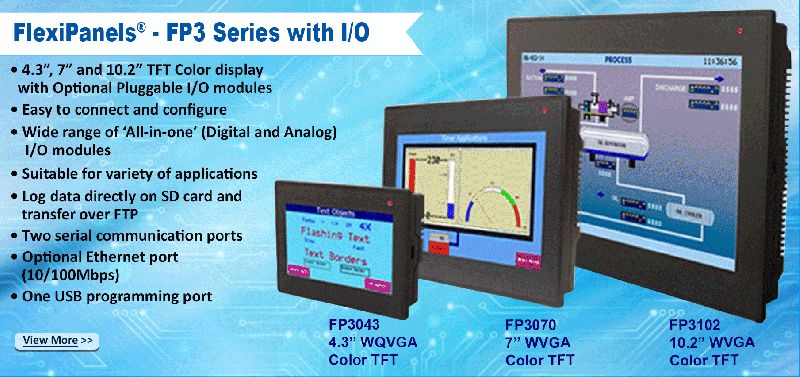
| Features | |
| 4.3, 7 and 10.2 TFT Color display with Optional Pluggable I/O modules | |
| Easy to connect and configure | |
| Wide range of All-in-one (Digital and Analog) I/O modules | |
| One USB Host port | |
| One Ethernet port with multiple protocol support and FTP | |
| One SD card slot for programming or data logging | |
| Supports Horizontal and Vertical display orientation | |
| High quality color display | |
| Front Panel mounting with IP66 rating | |
| Multilanguage support with true type Windows fonts | |
| CE, UL Class I Div 2, RoHS | |
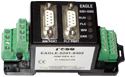
| Features | |
| DIN Rail or Panel mounted compact I/O modules | |
| Indication for Diagnostics, Power and Communication | |
| Adds I/O capability to your PLC, SCADA and Modbus networked devices | |
| Programmable inputs allow same modules to accept RTD, mA, mV | |
| 12 bit 8 universal analog inputs or with 4 Universal Analog inputsand 04 analog outputs | |
| Direct connection to PLC programming terminal with support for most PLCs | |
| Can be multidropped as Modbus Slave on RS485 Network | |
| Common Programming software for the entire Eagle family.FREE!! | |
| CE marked | |
| Specifications |
| For Voltage inputs For Current inputs For RTD input For Thermocouple input |
| Basic Eagle Operations | ||||||||||||||||||||||||
| Eagle units accept universal field inputs (such as RTD, T/C, mA, and mV) and convert them to actual field values like temperature, pressure etc. before sending them to the PLC. Similarly it can also read values in PLC registers and scale the 4-20mA output accordingly. Input and Output channels of Eagle are user configurable and any combination of input types is possible. Eagle Setup Software helps the user to configure the Eagle units and use them as per his requirements. Linearisation: 16 point linearisation is provided for mV and mA inputs, which helps the user to convert non-linear segments into required engineering value. Eagle units have two Communication Ports. Port1 (RS232/485) is connected to PLC and Port2 acts as Programming or Slave Port. Any Prizm model can be connected on Port 2 as a HMI. | ||||||||||||||||||||||||
| ||||||||||||||||||||||||
| ||||||||||||||||||||||||
| Model | Analog Inputs | Analog Outputs | Digital Inputs | Digital Outputs | Part Number |
|
|
2 Universal | 1 (4-20 mA) | 3 | 2 | Eagle-0201-0302-U |
|
|
4 Universal |
4 (4-20 mA/ 0-10 VDC) |
0 | 0 | Eagle-0404-U |
|
|
8 Universal | 0 | 0 | 0 | Eagle-0800-U |
| Input Type | Temperature Range | 1 bit Corresponds to |
| J | -210 to 770º C | 0.43º C |
| K | -200 to 1373º C | 0.61º C |
| E | -200 to 1000º C | 0.32º C |
| R | -50 to 1769º C | 2.04º C |
| S | -50 to 1769º C | 2.31º C |
| B | 0 to 1820º C | 3.21º C |
| N | -200 to 1300º C | 0.7º C |
| T | -200 to 400º C | 0.47º C |
| Analog Outputs | |
| Resolution | 12 Bit |
| Load: 4-20 mA 0-10 V DC |
Less than 500 ohms Minimum 400 ohms |
| Temperature Drift (for Digital Count) | 60 PPM |
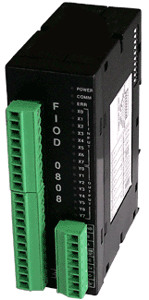
| Features | |
| Low cost compact Digital I/O modules with DIN rail mounting | |
| 2 wire RS 485 port provided on pluggable terminal block | |
| User definable Address, Baud rate and Parity through DIP Switch | |
| High Speed Modbus RTU (Slave) communication | |
| LED indication for each Input and Output , COM Port and Power ON | |
| No configuration software required | |
| Relay and Transistor outputs available | |
| CE marked with optional UL certification | |
| Basic FIOD Operations | |
| FunctionThe FIOD series products add digital capability to PLC / SCADA. Models are available that offer upto 16 digital inputs and upto 16 digital outputs.The digital inputs and outputs are isolated from the host device. FIOD has one RS 485 (2 Wire) communication port to connect to host device.Communication settings like baud rate, parity and station ID can be set by DIP Switch. Communication with HostFIOD module supports Modbus RTU (Slave) Protocol. The communication can be done with Host through 2 wire RS 485 Network.In case of communication failure with Host, all the outputs are switched OFF. Modbus Registers MappingThere are 128 Modbus registers supported in FIOD. Out of which, 64 are input registers (1 to 64) which are mapped to input coils 1 to 1024. FIOD has 64 output registers (65 to 128) which are mapped to output coils 1025 to 2048.First 16 coils from 1 to 16 are assigned for FIOD inputs (1 to 16).Coils from 1025 to 1040 are assigned for FIOD outputs (1 to 16). Modbus Mapping of Registers and Coils are mentioned below : Sr. Register Range Modbus ModbusNo. /Coil Mapping Tag Length 1. Input Register 1-64 40001-40064 2 -bytes2. Output Register 65-128 40065-40128 2 -bytes3. Input Coil 1-1024 00001-01024 1-bit4. Output Coil 1025-2048 01025-02048 1-bit |
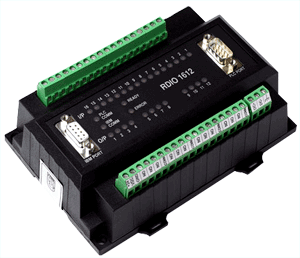
| Features | |
| DIN rail or panel mounted compact Digital I/O module | |
| Direct connection to PLC programming port | |
| Direct connection as Modbus Slave on RS485 network or RS232 link | |
| Up-to 32 digital inputs and 32 digital outputs | |
| Dual serial ports for connection of programming terminal / Operator Interfaceor SCADA | |
| LED indication for each I/O | |
| Diagnostic indication for communication and power | |
| Common programming software for the entire RDIO family.FREE!! | |
| CE marked with optional UL certification | |
| Basic RDIO Operations |
| FunctionThe RDIO series products add digital capability to your PLC / SCADA. Models are available that offer upto 32 digital inputs and upto 32 digital outputs to the PLC / SCADA. The configurationis done using the setup software. The digital inputs and outputs are isolated from the host device. RDIO has two communication ports. One port is used to connect to the PLC and second port can be used to connect an Operator Interface such as one of the Prizm series products or an IBM PC to configure the RDIO. The communication between the RDIO and PLC is optimized for speed to allow fastdata transfer. PLC CommunicationThe setup software defines the block of PLC registers used for communication. Register words are used for tracking inputs and outputs. Data is either sent to the specified register in the PLC or received from the register designated as Output register. The unit scans PLC registers continuously and evaluates the outputs. RTU ModeThe RDIO can also be configured as Modbus RTU useful for data acquisition. The Modbus protocol allows the user to use off the shelf SCADA software such as ASTRA and other host devices. The unit offers RS232 as well as RS485 hardware layers. Digital I/OsThe I/Os are isolated and in case of outputs separate ground can be made available for each output. The Unit has LED indication for each I/O.The unit is configured using the Windows based setup software. This will define the desired parameters for the unit like the inputs and outputs to be used, PLC registers, etc. |
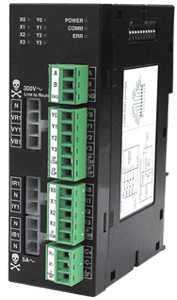
| Features | |
| Low cost compact 3 phase Energy measurement module | |
| 3 phase voltage input up to 300 Vrms (Line-Neutral) and current input up to 5 A can be measured | |
| Measures Voltage, Current, Frequency, Active Power, Reactive Power, True Power, Average Power and Power Factor | |
| Facility for 4 bi-directional digital inputs and 4 digital NPN outputs (open collector) | |
| High Speed Modbus RTU (Slave) communication | |
| 2 wire RS-485 Communication port (isolated) on pluggable terminal block | |
| User definable Address, Baud rate and Parity through convenient DIP Switches | |
| LED indication for each Input and Output, COM port and Power ON | |
| No configuration software required | |
FunctionFIOD-EN-0404-C measures 3 phase Energy and adds digital capability to a PLC / SCADA system.The module has 3 phase isolated Voltage and Current inputs . It also has 4 digital inputs and 4 digital outputs that can be read and controlled by the Modbus master. The digital inputs and outputs are isolated from the host device. The module has one RS485 (2 wire) communication port to connect to the host device. Communication settings like baud rate, parity and station ID can be set by DIP switches.
Communication with HostThe module supports Modbus RTU (Slave) Protocol. It communicates with the Host through 2 wire RS 485 Network. In case of communication failure with Host, the user can configure watchdog time-out and failure mode for the outputs.
 Prashant Bagade (Renu Electronics Pvt. Ltd.)
 Survey No. 2/6, Baner Road, Pune, Maharashtra, India
 Share us via